OneLogin
Create an OIDC app in OneLogin and add it as an OAuth integration in the Facets Control Plane to enable single sign-on for your users.
Prerequisite
- Users must have Write on the OAuth Integration category (permission token
OAUTH_INTEGRATION_WRITE); see Permissions Reference.
How to Create an Application in OneLogin?
- Log in to your OneLogin console and open the admin portal.
- Navigate to Applications > Applications from the top pane and click Add App.
- Search for OpenId Connect (OIDC) in the OneLogin app catalog and select it.
- Now, mention the Display Name, Description(optional).
- In the Configuration tab, mention the Redirect URI.
Eg:https://<control-plane-url>/login/oauth2/code/<registration-ID>📘Replace
<control-plane-url>with your organization's Control Plane URL, and note down the<registration-ID>. The same value goes into your Control Plane later. - In the SSO tab, under Token Endpoint, select the Authentication Method as POST.
- In the Users tab, assign the app to relevant users or groups by selecting them and adding the app to their assigned applications.
- Click Save.
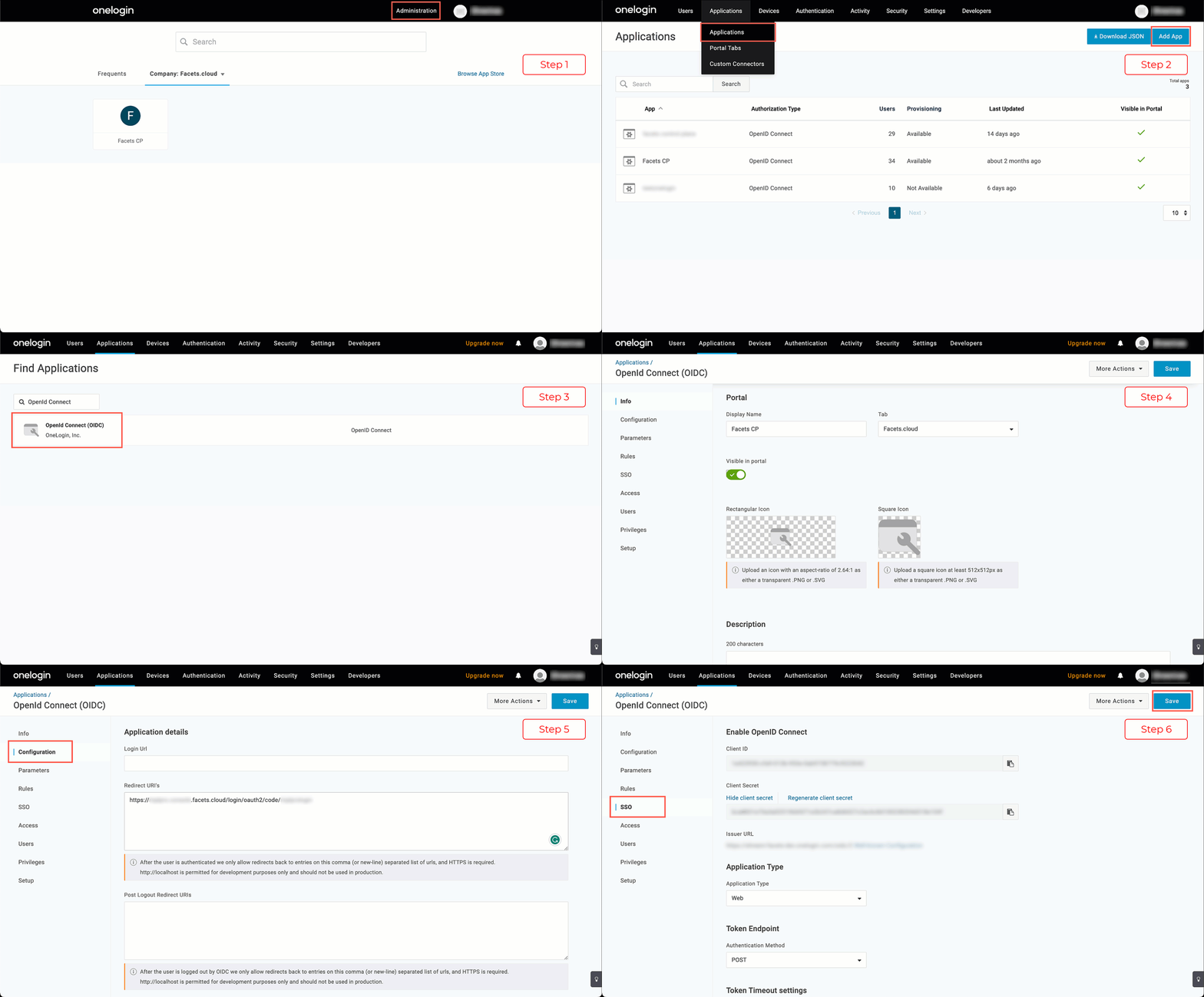
You have successfully created an application in OneLogin.
How to Add Integration for OneLogin in Facets?
-
Log in to your Control Plane and navigate to Settings > OAuth Integrations from the left pane.
This page displays all the configured OAuth Integrations in Facets. -
Click Add Integrations.
-
Select OneLogin as the provider.
-
Fill in the following information:
-
Registration ID
-
Client ID
-
Client Secret
-
Issuer URL
📘All three come from the OneLogin application you created. Log in to the OneLogin console, open the application, and the Client Id, Client Secret and Issuer URL are all on the SSO tab.
-
Login Button Text: Choose the text that will appear in the Control Plane Login screen. Facets recommends using your organization's name.
-
-
Click Create.
You have successfully set up OneLogin integration in Facets.