Continuous Integration
How Facets module repos preview modules on pull requests and publish them on merge, using the generated Facets Module CI workflow or your own CI.
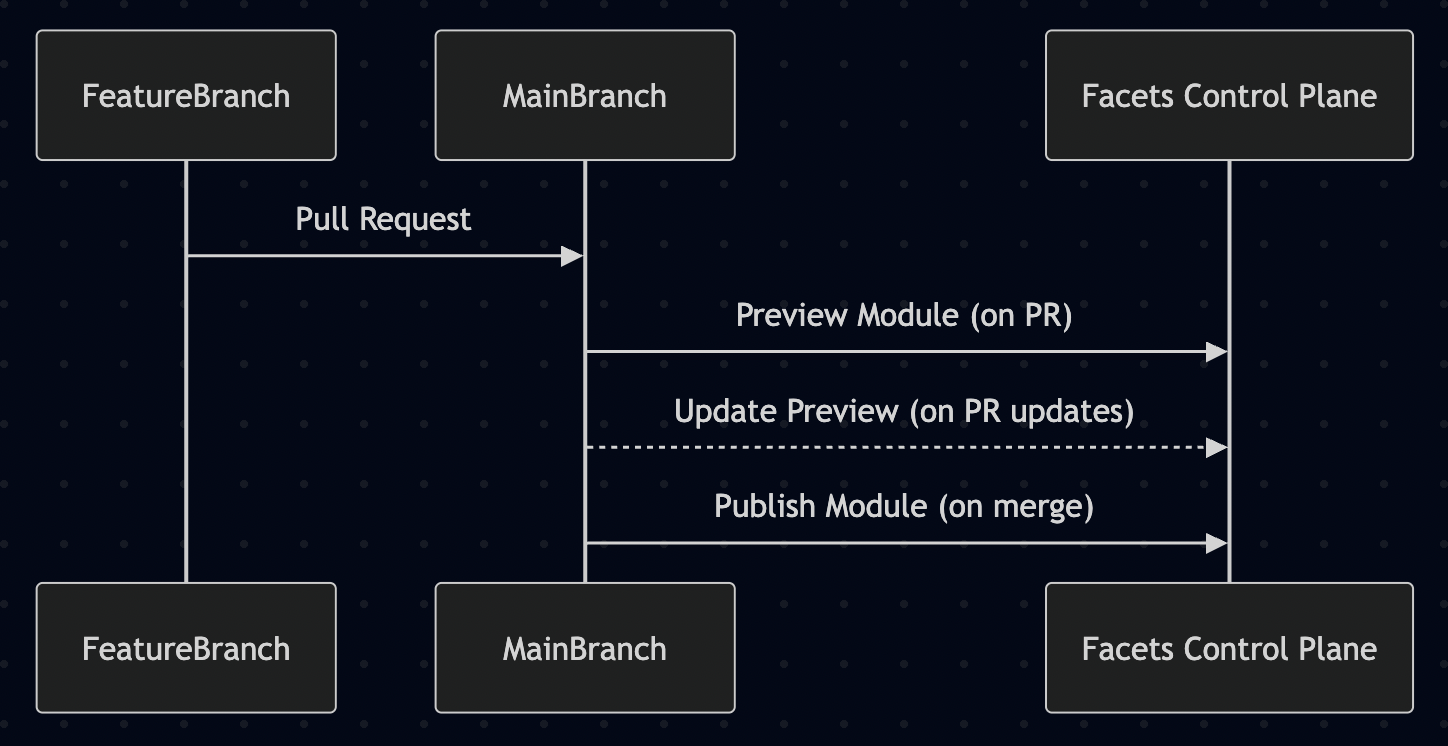
This guide outlines a clean and consistent CI workflow to develop, test, and publish Terraform modules using GitHub Actions and the Facets control plane.
If you connected your modules repo through the Migrate modules to a new repo route, Facets already installed this workflow for you, start at The Generated Workflow. If you attached an existing repo, or you use GitLab or Bitbucket, start at Bring Your Own CI.
1. Development
- DevOps engineers create or update modules in a feature branch off the repository's default branch.
- No preview is triggered at this stage.
- Modules can be tested locally or previewed from local with
raptor create iac-module -f ./modules/<intent>/<flavor>/<version>, which uploads the module at the PREVIEW stage. See the Praxis CLI.
2. Preview on pull request
- When a PR is raised against the default branch, CI automatically:
- Registers the module as a preview in the Facets control plane.
- This enables teams to test the module in real environments.
- Any update to the PR will update the preview module automatically.
3. Publish on merge
- Once approved, merging the PR to the default branch triggers CI to:
- Publish the module in the Facets control plane.
- Mark it as production-ready and available across projects.
The generated workflow
Facets commits .github/workflows/facets-module-ci.yml into the repository alongside your exported modules. The workflow is named Facets Module CI, and it is the documented default for module CI. It arrives already wired to the reusable action Facets-cloud/github-actions/module-ci-action@v1, pinned to a version rather than tracking a branch, already scoped to the right paths, and with its credentials already provisioned as repository secrets.
Do not add a second module workflow on top of it, two workflows watching the same paths publish the same module twice.
The workflow file
Here is the complete workflow as it lands in a repository whose default branch is main and that has no path prefix configured:
name: Facets Module CI

# Managed by the Facets control plane. Validates and publishes custom modules on change.
on:
  pull_request:
    types: [opened, synchronize, reopened, closed]
    paths:
      - "modules/**"
  push:
    branches:
      - "main"
    paths:
      - "modules/**"

permissions:
  contents: read
  pull-requests: write # preview comment; also lets cleanup read the PR's commits

jobs:
  module-ci:
    runs-on: ubuntu-latest
    steps:
      # No checkout step needed, the action performs its own full-history checkout.
      - name: Facets Module CI
        uses: Facets-cloud/github-actions/module-ci-action@v1
        with:
          control_plane_url: ${{ secrets.CONTROL_PLANE_URL }}
          username: ${{ secrets.FACETS_USERNAME }}
          token: ${{ secrets.FACETS_TOKEN }}
          github_token: ${{ secrets.GITHUB_TOKEN }}
          path-prefix: ""
Adding a shallow checkout ahead of the action hides the history it diffs and causes it to miss changed modules.
The branch name and the path prefix come from what you configured when you connected the repo, Facets substitutes both before committing the file, so your copy names your own default branch. If you set a path prefix of infra, both path filters read infra/modules/** and the path-prefix input carries that prefix instead of an empty string.
- The
closedpull request type is load-bearing. It is what removes the preview module when a PR merges or closes. Drop it from thetypeslist and stale previews pile up in the control plane.
Required secrets
The workflow reads three repository Actions secrets. It also passes GITHUB_TOKEN, but that one is not a secret you set, GitHub supplies it to every workflow run automatically. There is no fourth secret to configure.
| Secret | Holds |
|---|---|
CONTROL_PLANE_URL | The URL of the control plane the modules publish to |
FACETS_USERNAME | The username of the CI service account created during migration |
FACETS_TOKEN | The access token for that CI service account |
Facets provisions all three during the Provision Actions secrets step of migration, and records a status of set, failed, or skipped for each one. The CI service account is created before the export runs, and its role is validated to carry module read, write, and delete permissions, so the workflow does not ship only to fail on permissions during its first publish.
If any secret does not provision, the migration still succeeded. Set the missing secrets by hand in the repository's Actions secrets; the README that migration committed into the repo names them. For the token secret specifically, use Rotate CI token, the new value appears exactly once.
Why the first commit does not trigger CI
The bootstrap commit that installs the workflow carries [skip ci] in its message. Without it, the workflow would fire on its own arrival and immediately re-publish every module that was just exported. Your CI starts on the first real change you push, not on the migration itself. A brand-new workflow with no runs against it is expected, not broken.
Bring your own CI
Write your own CI when any of these apply:
- You connected your repo through the Attach an existing repo route, which registers the repo without installing anything.
- Your modules live in GitLab or Bitbucket.
- You already run per-purpose workflows and want to keep them. Facets' own module repositories work this way, with separate preview, publish, and cleanup workflows.
The samples below use Facets-cloud/github-actions/module-preview-action@master for both the preview and the publish job, switching behaviour through its publish and publishable inputs. Check out the GitHub Action source to replicate this flow in other systems.
module-ci-action and module-preview-action are two different actions with two different input contracts. Their secret names, input names, and defaults are not interchangeable, the samples below read FACETS_API_TOKEN, while the generated workflow reads FACETS_TOKEN. Copy each sample as a whole, and do not carry names across from the other action.
Preview on PR to Main
name: "Preview Module on PR to Main"

on:
  pull_request:
    branches: [main]
    paths: ["**/*.yaml", "**/*.tf"]
  workflow_dispatch:

jobs:
  preview:
    runs-on: ubuntu-latest
    steps:
      - name: Run Facets Module Preview Action
        uses: Facets-cloud/github-actions/module-preview-action@master
        with:
          control_plane_url: ${{ secrets.CONTROL_PLANE_URL }}
          username: ${{ secrets.FACETS_USERNAME }}
          token: ${{ secrets.FACETS_API_TOKEN }}
          dry-run: false
          all-modules: false
          auto-create-intent: true
          publish: false
          publishable: false
Publish on Merge to Main
name: "Publish Module from Main"

on:
  push:
    branches: [main]
    paths: ["**/*.yaml", "**/*.tf"]
  workflow_dispatch:

jobs:
  publish:
    runs-on: ubuntu-latest
    steps:
      - name: Run Facets Module Publish Action
        uses: Facets-cloud/github-actions/module-preview-action@master
        with:
          control_plane_url: ${{ secrets.CONTROL_PLANE_URL }}
          username: ${{ secrets.FACETS_USERNAME }}
          token: ${{ secrets.FACETS_API_TOKEN }}
          all-modules: false
          publish: true
          publishable: true
          auto-create-intent: true
Whichever CI you write, your repository still has to follow the modules/<intent>/<flavor>/<version>/ layout beneath your configured path prefix for Facets to resolve the modules. See Modules Repo for the full layout.
Related
- Modules Repo - Connect a git repository to your control plane and govern what publishes from it
- Module Registry - The catalogue your CI publishes into
- Versioning Strategy - How module versions map to directories
- API Reference - Programmatic access
- Praxis CLI - Validate and upload a module from your machine before opening a pull request
Modules Repo
Connect a git repository as the source of truth for your custom modules, migrate published modules into it, and provenance-check every publish.
Versioning Strategy
How Facets modules version safely: major versions in facets.yaml for breaking changes, soft versioning for compatible updates, and per-version directories.