How Facets works
How a requirement becomes a deployment in Facets, and how the Kubernetes-based control plane orchestrates it, whether driven by a person, the Praxis CLI, or a Praxis agent.
A request goes in. A running environment comes out. This page traces the path between the two, and the machinery that runs it.
You declare what you need, or an agent does. The control plane works out how to build it. The same pipeline deploys it, the same way, to every environment.
Every step can be driven by a person, the Praxis CLI, or an agent from Praxis, Facets' AI agentic platform, all through one control plane with one audit trail. New to terms like Intents, Flavors, or Blueprints? Core concepts defines each.
From requirement to deployment
From an empty control plane to a deployed environment. Two services do the heavy lifting, so name them up front:
- Orchestrator: the control plane service that translates a Blueprint into environment-specific Terraform code.
- Managed Pipeline: the execution engine that runs that Terraform and applies the changes to your cloud.
The path a requirement takes
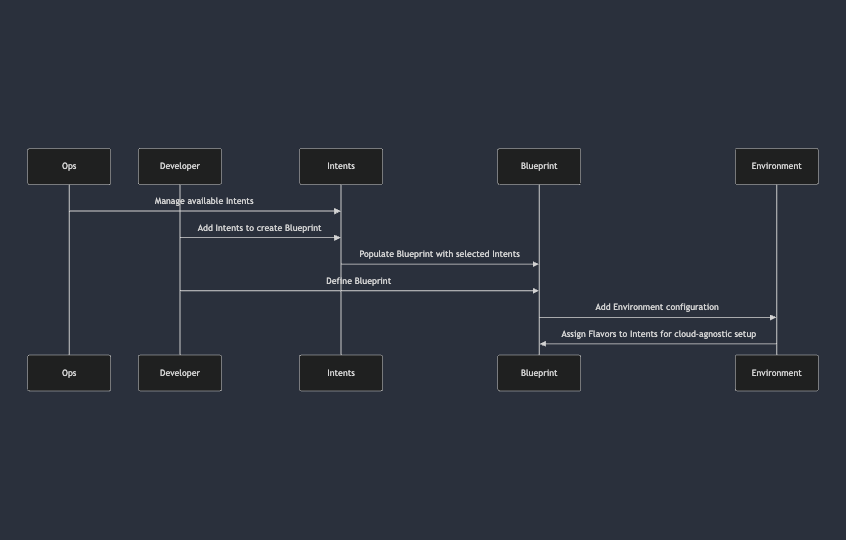
- Populate the control plane: a new control plane has no modules. Ops imports a project type to load the official modules and output types for the cloud. This is the reusable set of building blocks everything else is built from, adapted by Ops to the organisation's conventions.
- Create a Project: a Project is the starting point. Once it exists, developers can design infrastructure in a Blueprint and deploy it across multiple environments.
- Design the Blueprint: developers construct a Blueprint by selecting Intents (what they need) and the Flavors that implement them, defining the architecture of the product without deploying anything yet.
- Orchestrate: at launch, the Orchestrator transforms the Blueprint into deployable Terraform code for the target environment.
- Deploy: the Managed Pipeline executes that code and provisions the product on your cloud infrastructure.
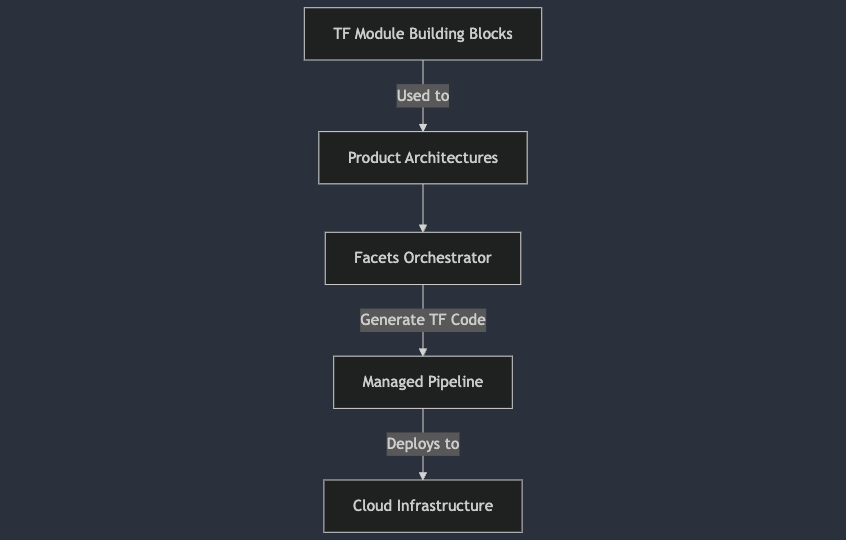
The last two steps are the deployment engine: the Orchestrator translates the Blueprint into Terraform code, and the Managed Pipeline executes it to stand up a cloud environment.
Architecture
The Facets control plane runs as a microservices application inside a Kubernetes cluster. From there it manages cloud resources across AWS, Azure, and GCP. It's self-deployable: the entire stack can be stood up in a customer's cloud account through an automated install (see Self-hosted for the install paths).
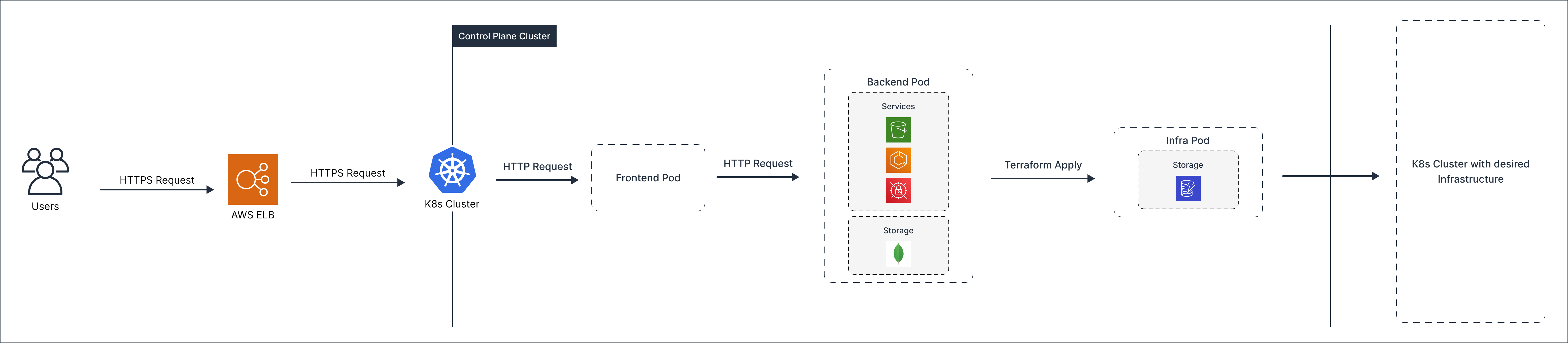
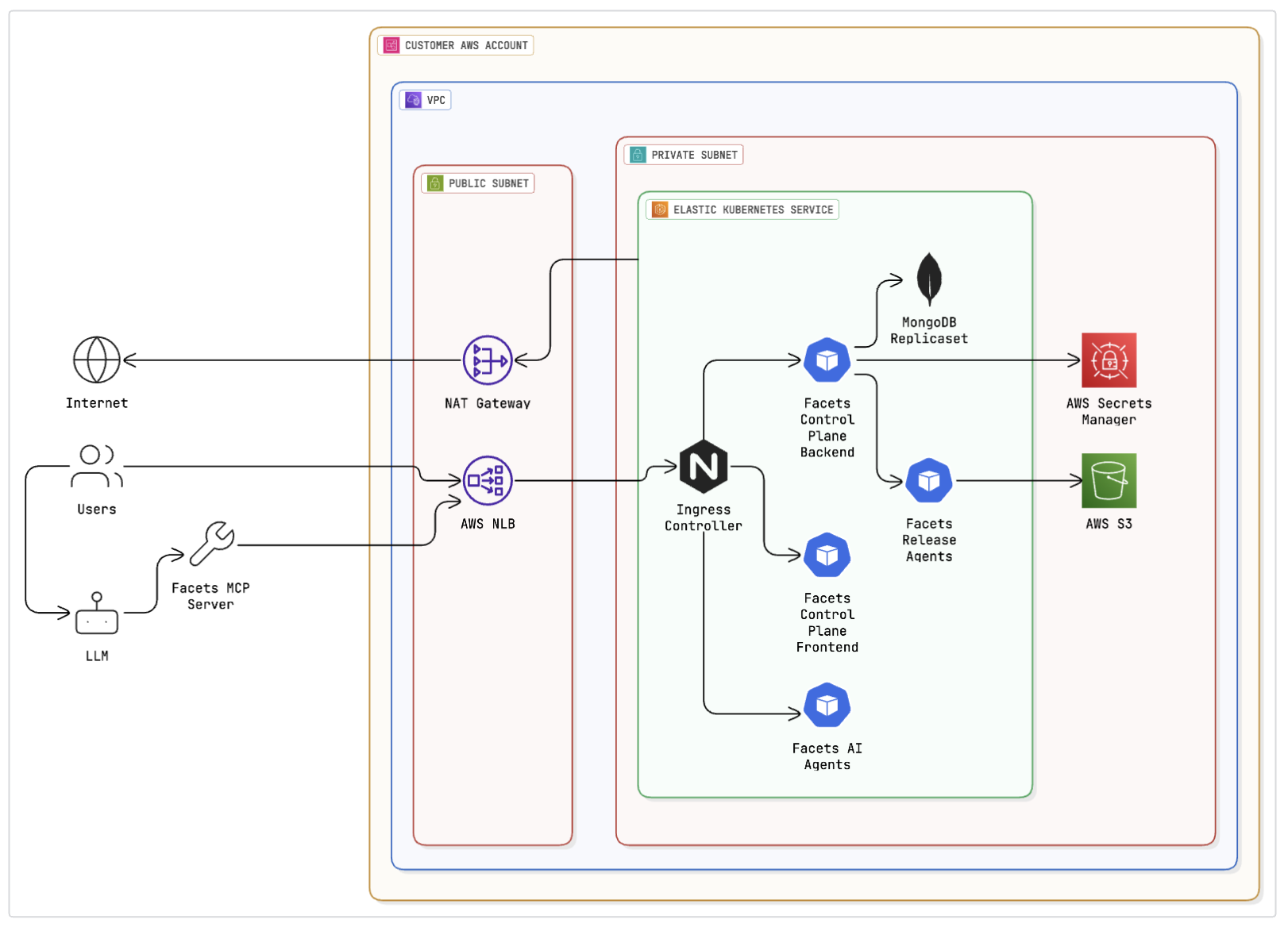
The microservices design means the control plane itself benefits from the same primitives it provisions: isolated services, declarative deployment, and a managed pipeline for upgrades.
Capabilities enabled by the architecture:
- Multi-cloud management from a single plane: one control plane can manage environments on AWS, GCP, and Azure simultaneously. Cloud credentials are stored per-environment; the control plane brokers access at release time.
- Automated setup: the entire stack is stood up through automation (CloudFormation on AWS, Deployment Manager on GCP, ARM templates on Azure). No manual cluster configuration is required.
- Self-upgrading: Facets pushes control-plane updates through the same Managed Pipeline the platform uses for customer workloads. Upgrades are zero-downtime rolling deployments.
- Isolated pipeline execution: Terraform runs are executed in ephemeral Kubernetes Jobs, not in long-running shared processes. State and credentials are scoped to each job and discarded after execution.
The control plane itself never touches your application workloads. It provisions the cloud infrastructure your applications run on, but your application containers and data remain entirely within the environments you define.
For the per-cloud breakdown of what gets stood up during install, see the AWS, GCP, or Azure install pages.
Extended capabilities
Extend Facets with your own agent skills, MCP servers, duties, modules, and UI, and build them with AI so the platform delivers what your infrastructure needs.
vs. Terraform automation
How Facets differs from Terraform automation tools like env0 and Terraform Enterprise: a typed abstraction over Terraform, not a faster way to run the Terraform you still write by hand.