GCP
Set up your self-hosted Facets control plane in GCP, covering required APIs and permissions, GKE and networking resources, Secret Manager modes, and Shared VPC.
Welcome to Facets! In this getting started guide, we will walk you through the process of getting your control plane.
- Get a Demo : To get started, simply request a demo by contacting the Facets team. Our team will understand the requirements and will help you get started.
- Submit Service Account Details:
You will receive a form to submit your Google Cloud Service Account details. Ensure that:
- You use a dedicated GCP project for better security and isolation. A dedicated subscription is recommended to set up the Facets control plane.
- Enable the following google APIs in the project where Facets control plane resources are to be deployed.
"analyticshub.googleapis.com" "artifactregistry.googleapis.com" "autoscaling.googleapis.com" "certificatemanager.googleapis.com" "cloudapis.googleapis.com" "cloudkms.googleapis.com" "cloudresourcemanager.googleapis.com" "cloudtrace.googleapis.com" "compute.googleapis.com" "container.googleapis.com" "containerfilesystem.googleapis.com" "containerregistry.googleapis.com" "dataform.googleapis.com" "dataplex.googleapis.com" "datastore.googleapis.com" "deploymentmanager.googleapis.com" "dns.googleapis.com" "gkebackup.googleapis.com" "iam.googleapis.com" "iamcredentials.googleapis.com" "logging.googleapis.com" "monitoring.googleapis.com" "networkconnectivity.googleapis.com" "oslogin.googleapis.com" "pubsub.googleapis.com" "redis.googleapis.com" "servicemanagement.googleapis.com" "servicenetworking.googleapis.com" "serviceusage.googleapis.com" "sql-component.googleapis.com" "sqladmin.googleapis.com" "storage-api.googleapis.com" "storage-component.googleapis.com" "storage.googleapis.com" "secretmanager.googleapis.com" - Ensure the service account has the necessary permissions :
"alloydb.clusters.create" "alloydb.clusters.delete" "alloydb.clusters.get" "alloydb.clusters.update" "alloydb.instances.create" "alloydb.instances.delete" "alloydb.instances.get" "alloydb.instances.update" "alloydb.operations.get" "cloudkms.cryptoKeyVersions.destroy" "cloudkms.cryptoKeyVersions.list" "cloudkms.cryptoKeys.create" "cloudkms.cryptoKeys.get" "cloudkms.cryptoKeys.getIamPolicy" "cloudkms.cryptoKeys.setIamPolicy" "cloudkms.cryptoKeys.update" "cloudkms.keyRings.create" "cloudkms.keyRings.get" "cloudsql.databases.create" "cloudsql.databases.delete" "cloudsql.databases.get" "cloudsql.instances.create" "cloudsql.instances.delete" "cloudsql.instances.get" "cloudsql.instances.list" "cloudsql.instances.update" "cloudsql.users.create" "cloudsql.users.delete" "cloudsql.users.list" "cloudsql.users.update" "compute.addresses.create" "compute.addresses.delete" "compute.addresses.get" "compute.disks.delete" "compute.disks.list" "compute.firewalls.create" "compute.firewalls.delete" "compute.firewalls.get" "compute.forwardingRules.create" "compute.forwardingRules.delete" "compute.forwardingRules.get" "compute.forwardingRules.setLabels" "compute.globalAddresses.createInternal" "compute.globalAddresses.deleteInternal" "compute.globalAddresses.get" "compute.globalOperations.get" "compute.healthChecks.create" "compute.healthChecks.delete" "compute.healthChecks.get" "compute.healthChecks.useReadOnly" "compute.instanceGroupManagers.create" "compute.instanceGroupManagers.delete" "compute.instanceGroupManagers.get" "compute.instanceGroups.delete" "compute.instanceGroups.use" "compute.instanceTemplates.create" "compute.instanceTemplates.delete" "compute.instanceTemplates.get" "compute.instances.list" "compute.networks.create" "compute.networks.delete" "compute.networks.get" "compute.networks.removePeering" "compute.networks.updatePolicy" "compute.networks.use" "compute.regionBackendServices.create" "compute.regionBackendServices.delete" "compute.regionBackendServices.get" "compute.regionBackendServices.use" "compute.regionOperations.get" "compute.routers.create" "compute.routers.delete" "compute.routers.get" "compute.routers.update" "compute.sslPolicies.create" "compute.sslPolicies.delete" "compute.sslPolicies.get" "compute.sslPolicies.update" "compute.subnetworks.create" "compute.subnetworks.delete" "compute.subnetworks.get" "compute.subnetworks.use" "compute.zoneOperations.get" "compute.zones.list" "container.clusterRoleBindings.create" "container.clusterRoleBindings.delete" "container.clusterRoleBindings.get" "container.clusterRoles.bind" "container.clusterRoles.create" "container.clusterRoles.escalate" "container.clusterRoles.get" "container.clusters.create" "container.clusters.delete" "container.clusters.get" "container.clusters.getCredentials" "container.clusters.list" "container.clusters.update" "container.configMaps.create" "container.configMaps.get" "container.cronJobs.create" "container.cronJobs.delete" "container.cronJobs.get" "container.deployments.create" "container.deployments.get" "container.namespaces.create" "container.namespaces.delete" "container.namespaces.get" "container.operations.get" "container.priorityClasses.create" "container.priorityClasses.delete" "container.priorityClasses.get" "container.replicaSets.list" "container.roleBindings.create" "container.roleBindings.delete" "container.roleBindings.get" "container.roles.bind" "container.roles.create" "container.roles.delete" "container.roles.escalate" "container.roles.get" "container.secrets.create" "container.secrets.delete" "container.secrets.get" "container.secrets.list" "container.secrets.update" "container.serviceAccounts.create" "container.serviceAccounts.delete" "container.serviceAccounts.get" "container.storageClasses.create" "container.storageClasses.delete" "container.storageClasses.get" "dns.changes.create" "dns.managedZones.list" "dns.resourceRecordSets.create" "dns.resourceRecordSets.delete" "dns.resourceRecordSets.list" "iam.roles.create" "iam.roles.delete" "iam.roles.get" "iam.roles.list" "iam.serviceAccounts.actAs" "iam.serviceAccounts.create" "iam.serviceAccounts.delete" "iam.serviceAccounts.get" "iam.serviceAccounts.getIamPolicy" "iam.serviceAccounts.list" "iam.serviceAccounts.setIamPolicy" "monitoring.metricDescriptors.list" "monitoring.timeSeries.list" "redis.instances.create" "redis.instances.delete" "redis.instances.get" "redis.instances.getAuthString" "redis.instances.list" "redis.instances.update" "redis.instances.updateAuth" "redis.operations.get" "resourcemanager.projects.get" "resourcemanager.projects.getIamPolicy" "resourcemanager.projects.setIamPolicy" "servicenetworking.operations.get" "servicenetworking.services.addPeering" "servicenetworking.services.get" "storage.buckets.create" "storage.buckets.delete" "storage.buckets.get" "storage.buckets.getIamPolicy" "storage.buckets.list" "storage.buckets.setIamPolicy" "storage.buckets.update" "storage.objects.delete" "storage.objects.get" "storage.objects.list" - The Facets team launches the Control Plane: After receiving your service account details, the Facets team will launch the control plane in your GCP environment. The setup is usually completed within 60 minutes.
- Welcome Email with Control Plane URL:
Once the deployment is successful, you will receive a welcome email containing:
- Your Facets Control Plane URL
- A username
- A password reset link Use these credentials to log in and start configuring your Facets environment.
Resources Deployed on GCP
The Facets Control Plane will include the following Google Cloud resources:
Networking
- Virtual Private Cloud (VPC): A dedicated VPC for the Facets control plane. For shared-VPC setups, see Advanced: Shared VPC below.
- Subnets:
- Private Subnets: Located in two separate GCP regions/zones, with Cloud NAT Gateways for outbound internet access.
- Public Subnets: Designed for managing external access.
Compute & Container Orchestration
- Google Kubernetes Engine (GKE):
- Cluster: A GKE cluster with encryption at rest enabled.
- Nodes: A GKE node pool with 8 vCPUs, 32GB RAM, and a 100GB root volume.
- Auto-scaling: Ensuring efficient resource allocation.
- Google Cloud Load Balancer (GLB):
- Two external HTTP(S) Load Balancers to distribute traffic across availability zones.
Storage & Security
- Database: postgres db for managing terraform state.
- Cloud IAM: Role-based access controls (RBAC) for fine-grained security policies.
- Cloud Logging & Monitoring:
- Google Cloud Operations Suite (formerly Stackdriver) integration for real-time monitoring and logging.
Deployment Options
You can choose any Google Cloud Region upto two Availability Zones for deploying your control plane.
For custom configurations such as resource scaling or high-availability setups, communicate your preferences to the Facets team.
Managing your control plane
After deployment, you can:
- Create custom blueprints to automate cloud infrastructure.
- Manage resources using the Facets UI or CLI.
- Monitor your workloads through integrated dashboards.
GCP Secret Manager
The Facets GCP Secret Manager feature enables secure storage and management of secrets using Google Cloud Platform (GCP) Secret Manager. This feature is specific to GCP control planes and provides multiple replication and storage options to accommodate different security and compliance requirements.
Quick Steps
- Ensure the Secret Manager API is enabled in your GCP Project. You can enable it through the Google Cloud Console or using the following gcloud command:
gcloud services enable secretmanager.googleapis.com - Choose one of the Secret Manager Modes.
- Connect and share the details with Facets team to enable this for the CP. Connect here.
Secret Manager Modes
The feature supports three operational modes, implemented in the GcpSecretsService:
AUTOMATIC_REPLICATION: Secrets are automatically replicated across multiple regions by GCP (default setting)USER_MANAGED_REPLICATION: Customer specifies which regions the secret should be replicated toREGIONAL: Secrets are available only in a specific region
Mode Selection Guide
Automatic vs. User-Managed Replication. When choosing between automatic and user-managed replication, consider these factors as described in GCP documentation:
Automatic Replication provides greater availability by replicating secrets to all available regions. Pros: higher availability, simpler management. Cons: may conflict with organisational policies, higher costs.
User-Managed Replication allows you to specify exactly which regions contain your secrets. Pros: fine-grained control, potentially lower costs, compliance with location restrictions. Cons: manual management overhead, potentially lower availability.
Regional Secrets are only available in specific regions supported by Secret Manager. Consider regional secrets when you have strict data residency requirements, want to minimise costs for rarely accessed secrets, or your applications only run in a specific region.
For a detailed comparison between regional and global secret options, see Google's comparison documentation.
Organisational Policy. If your organisation has implemented location restriction policies, automatically replicated secrets may be blocked by Organization Resource Location Restrictions. In that case use either USER_MANAGED_REPLICATION with approved regions or REGIONAL with an approved region.
Important: SecretManagerMode should not be changed after secrets have been migrated, to avoid access issues. When using modes other than AUTOMATIC_REPLICATION, gcp.secret.manager.region.id must be set to a supported region.
Advanced: Shared VPC
Most teams deploy the control plane into a dedicated VPC (the default). For organisations that already centralise networking in a host project and attach service projects, the control plane can also be launched into a shared VPC, keeping it on the same network fabric as other workloads.
When to use a shared VPC
- You already operate a host-project / service-project topology for networking governance.
- You need the control plane on the same VPC as services it talks to, without VPC peering.
- You want network policies enforced centrally rather than per-project.
Prerequisites
- A GCP organisation with a host project that has the
Compute Network Admin,Compute Network User,Organization Administrator, andOwnerroles, plus these custom permissions:compute.organizations.disableXpnHostcompute.organizations.disableXpnResourcecompute.organizations.enableXpnHostcompute.organizations.enableXpnResourcecompute.projects.getresourcemanager.projects.getresourcemanager.projects.getIamPolicyresourcemanager.projects.list
Step 1: Create the shared VPC in the host project
- Create at least two or three subnets with
/16CIDR ranges in the host project. - Add two secondary CIDR ranges (also
/16) on each subnet: these are needed for GKE pods and GKE services. - Reserve a subnet for Internal Load Balancers (ILBs) for Facets components.
- Enable Cloud NAT to allow outbound connections without exposing node IPs.
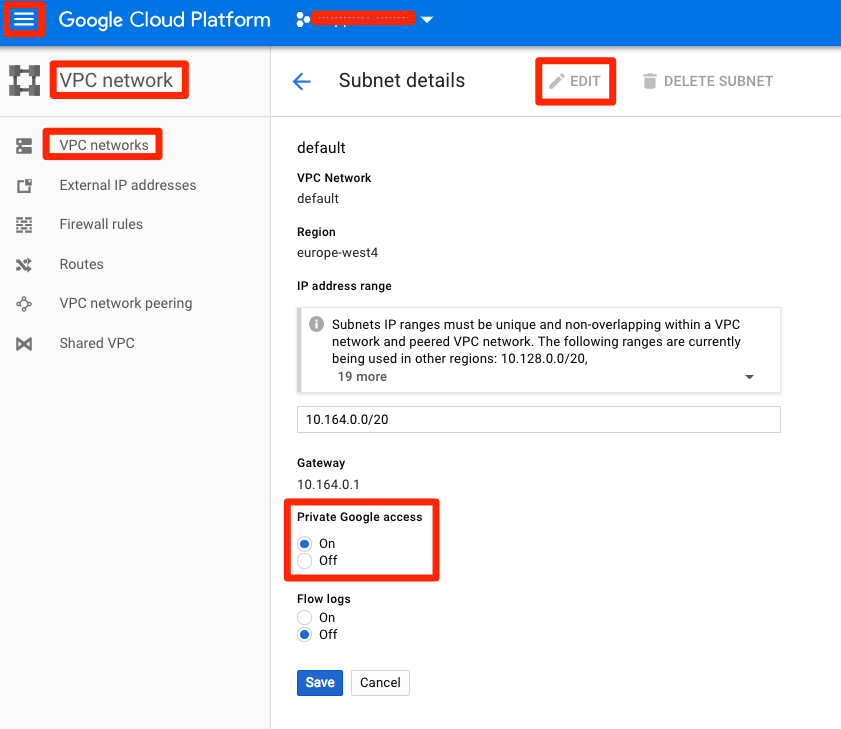
- Enable Private Google Access on the GKE subnets so the cluster can reach Google APIs without traversing the public internet.
- Allocate a Private Service Access range (required if you plan to use managed services like AlloyDB).
- Establish a Private GCP Connection for secure access to Google services.
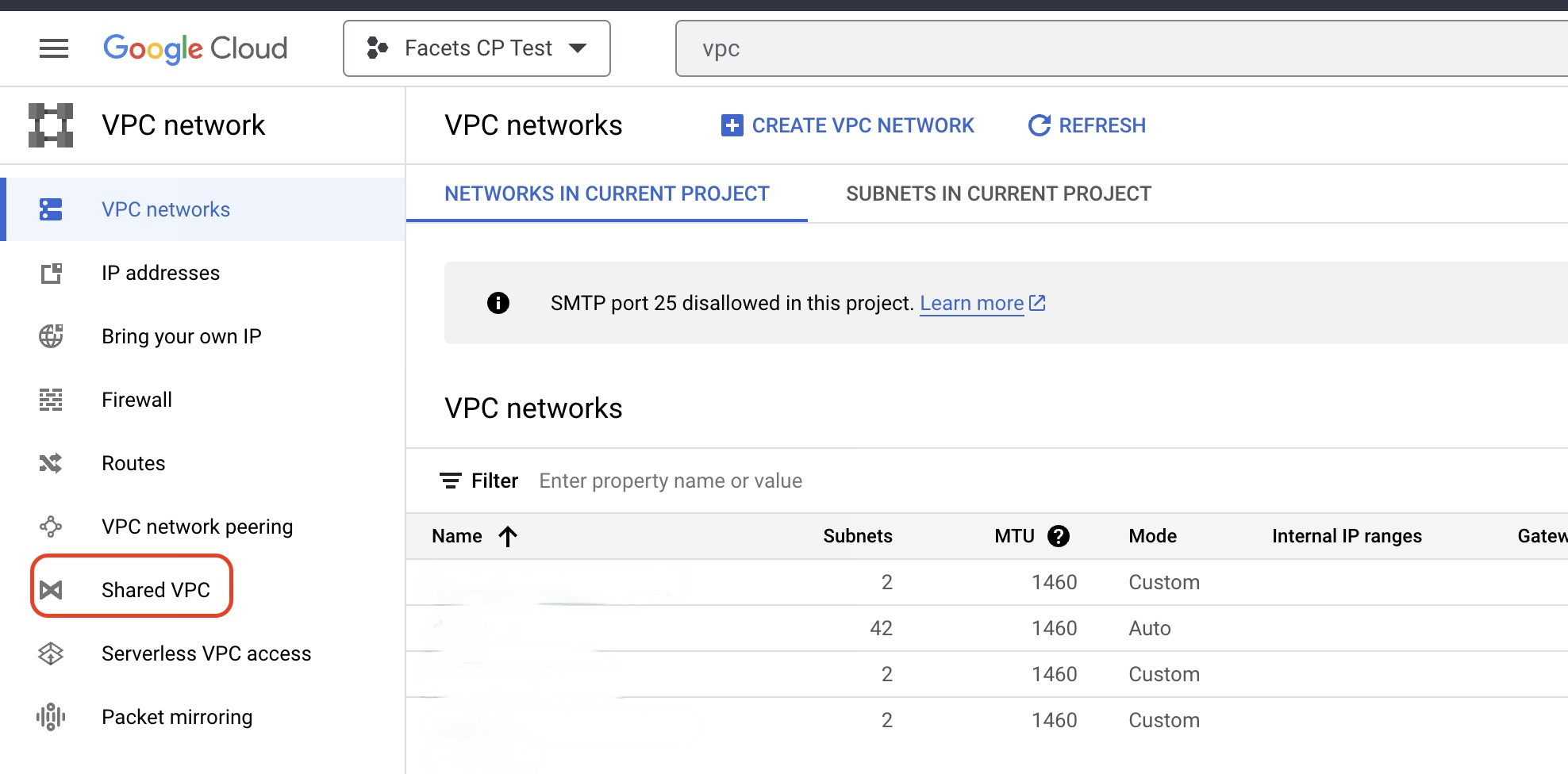
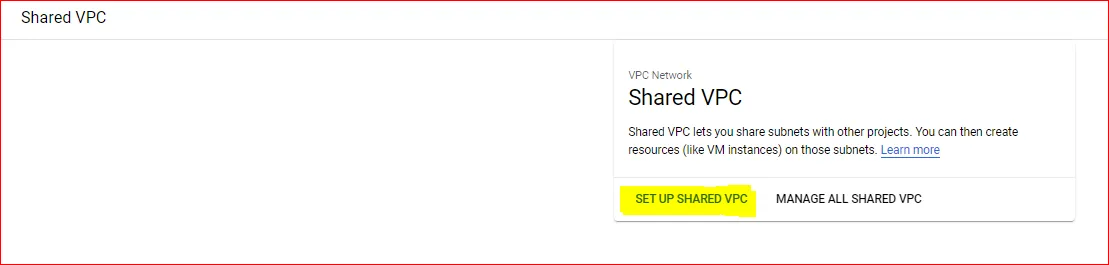
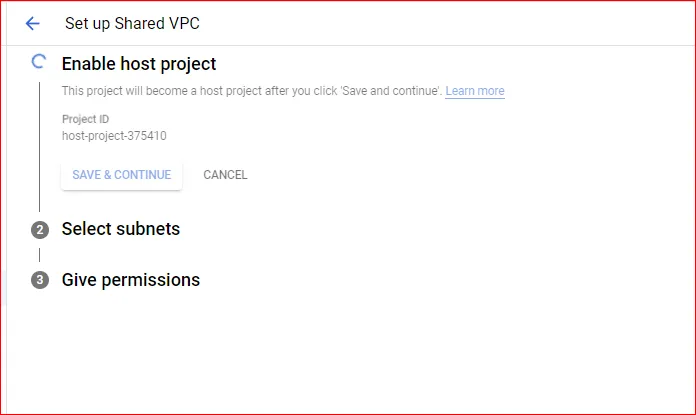
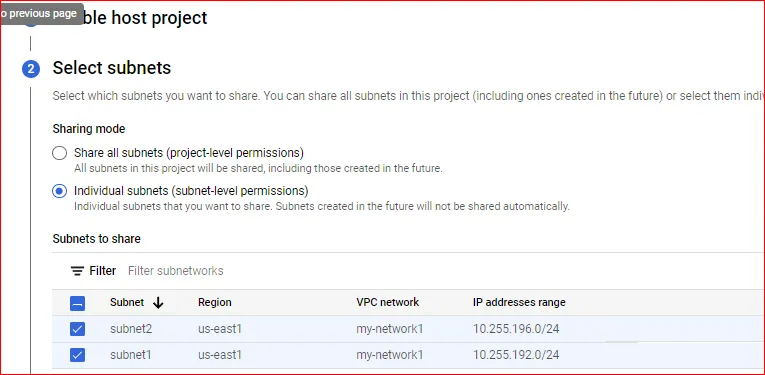
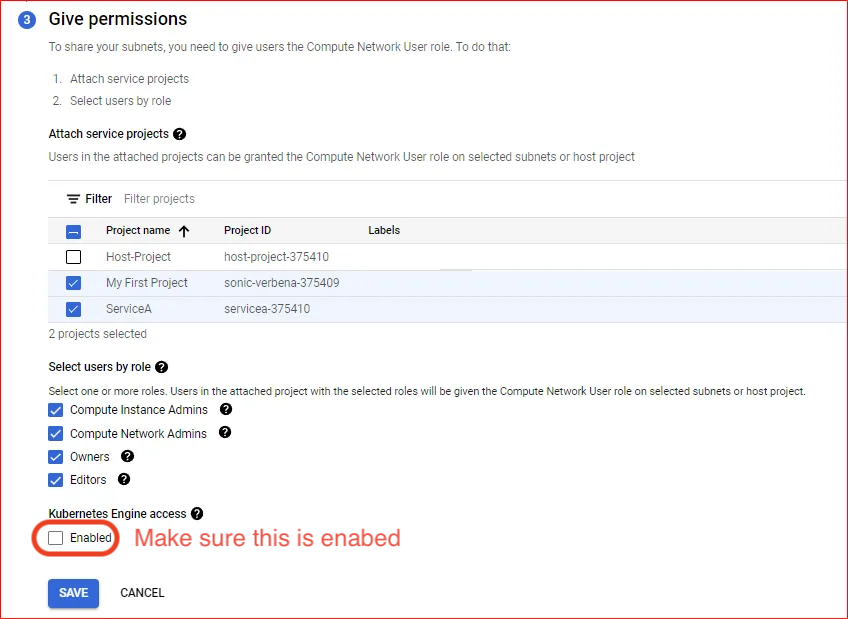
Once the shared VPC is enabled, provide the relevant details via the Facets UI.
You can't specify which subnet is used by which service project. When a subnet is shared, it's shared with every service project attached to it. To bind a subnet to a specific project, set per-subnet user permissions for the accounts or service accounts that project uses.
Step 2: Attach service projects
Ensure service projects are attached to the shared VPC with Kubernetes access enabled. The service projects then consume network resources from the host project.
Assign the following roles at the project level:
Compute Security Admin→service-<SERVICE_PROJECT_NUMBER>@container-engine-robot.iam.gserviceaccount.comKubernetes Engine Host Service Agent User→ the same service account above
Assign Compute Network User at the subnet level to each of:
<SERVICE_PROJECT_NUMBER>-compute@developer.gserviceaccount.com<SERVICE_PROJECT_NUMBER>@cloudservices.gserviceaccount.comservice-<SERVICE_PROJECT_NUMBER>@container-engine-robot.iam.gserviceaccount.com
Step 3: Configure the Facets service account
Inside the service project, create a service account dedicated to Facets. This account manages all Facets operations within the shared VPC.
In the host project, create a custom role with these permissions and attach it to the Facets service account:
compute.firewalls.createcompute.firewalls.updatecompute.firewalls.deletecompute.firewalls.getcompute.globalOperations.getcompute.networks.updatePolicycompute.subnetworks.get
That role gives the Facets service account just enough networking authority in the host project to manage firewalls and operate within the shared VPC.
Support & assistance
For any issues or additional configurations, contact Facets Support at support@facets.cloud.
AWS
Set up your self-hosted Facets control plane in AWS, covering the CloudFormation IAM role, the EKS, VPC, S3, and DynamoDB resources deployed, and backups.
Azure
Set up your self-hosted Facets control plane in Azure, covering service account requirements and the AKS, VNet, PostgreSQL, and supporting resources deployed.