Types of Validations
The validation types in Facets: non-existent and disabled resource references, invalid reference expressions, JSON syntax errors, and guardrail violations.
This feature is available on the Enterprise plan only.
The Validations Summary Panel tracks every validation issue arising from a fault in a resource's JSON, so you can pinpoint problems and avoid release failures. Each validation has a severity of Error or Warning; if any Error is present, the release will not trigger.
The validation types are non-existent resource reference, disabled resource reference, invalid reference expression, syntax error, and GuardRails compliance issue. Each is described below with an example.
Validation types
Non-existent resource reference
This error occurs when a resource JSON refers to a resource that does not exist.
Example: This error occurs if the resource "new-test-service" referred to in the rules below does not exist.
{
  "spec": {
    "basicAuth": false,
    "private": false,
    "force_ssl_redirection": true,
    "rules": {
      "backend": {
        "comment": "back-end",
        "domain_prefix": "",
        "path": "/api/employees/",
        "port": "${service.new-test-service.out.interfaces.http.port}",
        "service_name": "${service.new-test-service.out.interfaces.http.name}"
      }
    }
  }
}
Disabled resource reference
This error occurs when a resource JSON refers to a resource that exists but is marked as disabled, meaning the resource JSON is trying to access a resource that is currently not available for use.
Example: This error occurs if the resource "new-test-service" referred to in the rules below is disabled.
{
  "spec": {
    "basicAuth": false,
    "private": false,
    "force_ssl_redirection": true,
    "rules": {
      "frontend": {
        "comment": "front-end",
        "domain_prefix": "",
        "path": "/",
        "port": "${service.new-test-service.out.interfaces.main.port}",
        "service_name": "${service.new-test-service.out.interfaces.main.name}"
      }
    }
  }
}
Invalid reference expression
This error occurs when a reference expression in a resource json is not correctly formed or refers to undefined variables, secrets, or artifacts. This could include syntax errors, incorrect usage of reference expressions, attempts to access non-existing variables, secrets, or artifacts, etc. This error is designed to catch issues with the structure and use of reference expressions in the resource json.
Example: This error occurs if the secret "non-existing-secret" referred to in the configuration is not present.
{
  "env": {
    "secret_for_prod": "${blueprint.self.secrets.non-existing-secret}"
  }
}
Syntax error
This error occurs when the resource JSON is invalid, often due to syntax issues like missing commas or incorrect formatting.
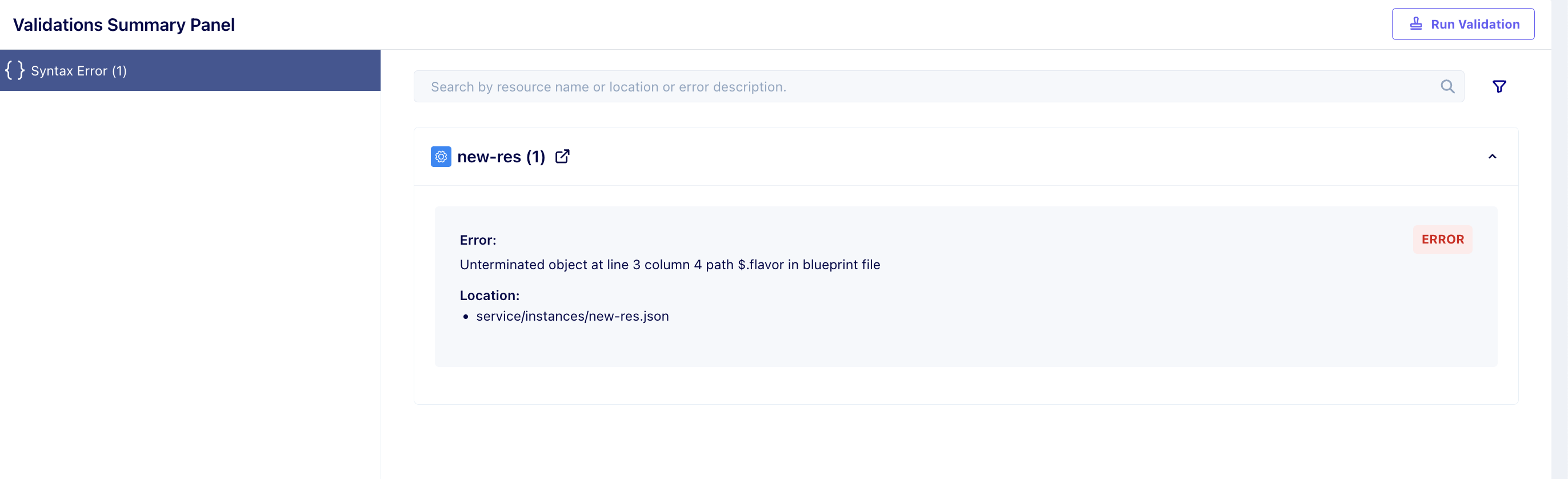
Example: In the below JSON file, there is a comma missing in line 2 after "VM". So we will see an error as shown in the image.
{
  "flavor": "VM"
  "metadata": {
    "labels": {}
  },
  "kind": "service",
  "disabled": true,
  "provided": false,
  "version": "0.11",
  "spec": {}
}
GuardRails compliance issue
This error occurs when a defined guardrail policy is violated. Guardrail policies enforce specific rules or standards, and any deviation from them can trigger this error.
Example: The panel groups these under GuardRails Compliance Issues and reports the failing policy by name, along with the blueprint file that breached it:
Error:
Policy test-himanshu failed with error: {guardrails={service_env_strings={all_strings=true, allow=true}}}

Location:
iam_policy/instances/test.json
The message names the policy that failed and the decision document its Rego returned, meaning the nested rule results that caused the failure. The Location names the resource file to fix.
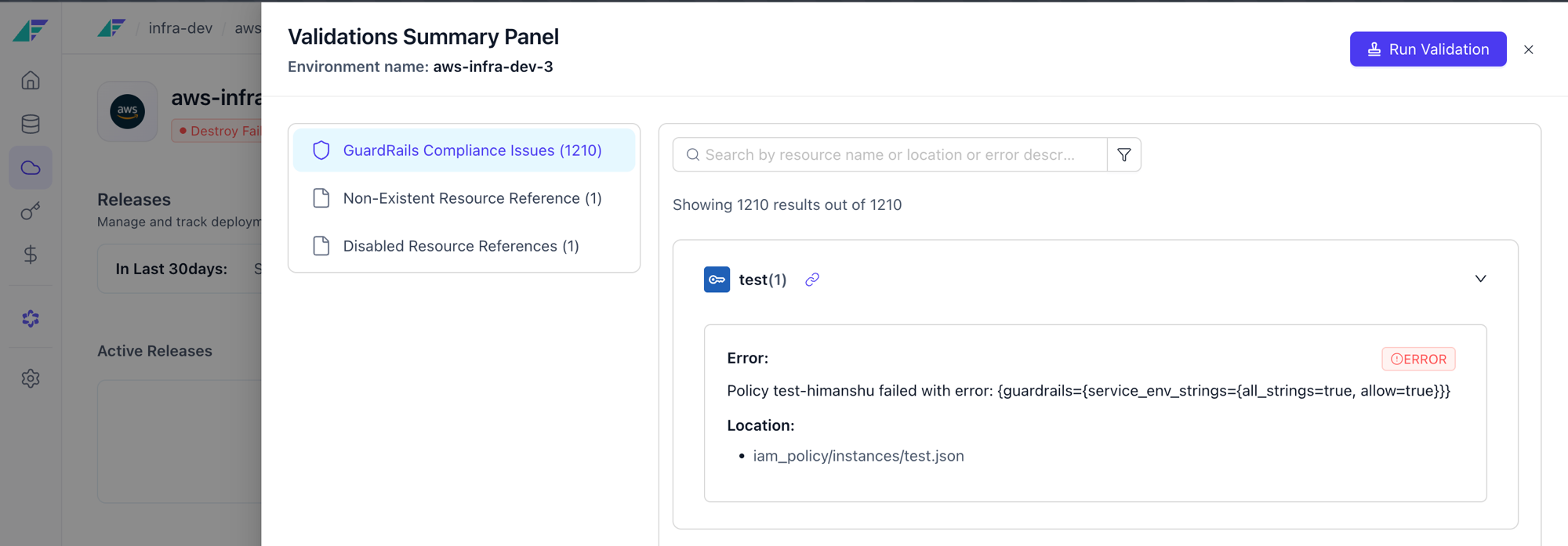
Validation panel
The Validations Summary Panel surfaces broken references, JSON errors, and guardrail violations every 5 minutes so you can fix issues before release.
Rolling back
Roll a Facets release back to a previous known-good state using stored S3 deployment context, with a two-phase plan and apply workflow.