Canary releases
Configure Argo Rollouts canary deployments for Facets services: set rollout behavior, trigger a release, monitor pods, then promote or abort.
A canary deployment is an Argo Rollouts-based strategy that rolls a change out to a subset of your infrastructure first, then promotes it to the full environment. It reduces risk by validating the change in a limited scope before full production exposure.
Supported resource type: service
Prerequisites
- A service resource configured in your Facets blueprint.
- A Kubernetes cluster with Argo Rollouts (included with Facets).
Required permissions:
- Plan Release / Apply Release Plan: to trigger releases.
- Promote: graduate a canary to stable. Abort: halt a canary rollout.
Step 1: Configure the canary strategy
In your service resource configuration JSON, set the deployment strategy to Canary and define rollout behavior:
{
  "spec": {
    "release": {
      "strategy": {
        "type": "Canary",
        "canary_strategy": {
          "enable_auto_abort": true,
          "auto_abort_timeout": 120,
          "max_surge": "1",
          "max_unavailable": 0,
          "min_ready_seconds": 30,
          "progress_deadline_seconds": 600,
          "scale_down_delay_seconds": 30
        }
      }
    }
  }
}
Key configuration options
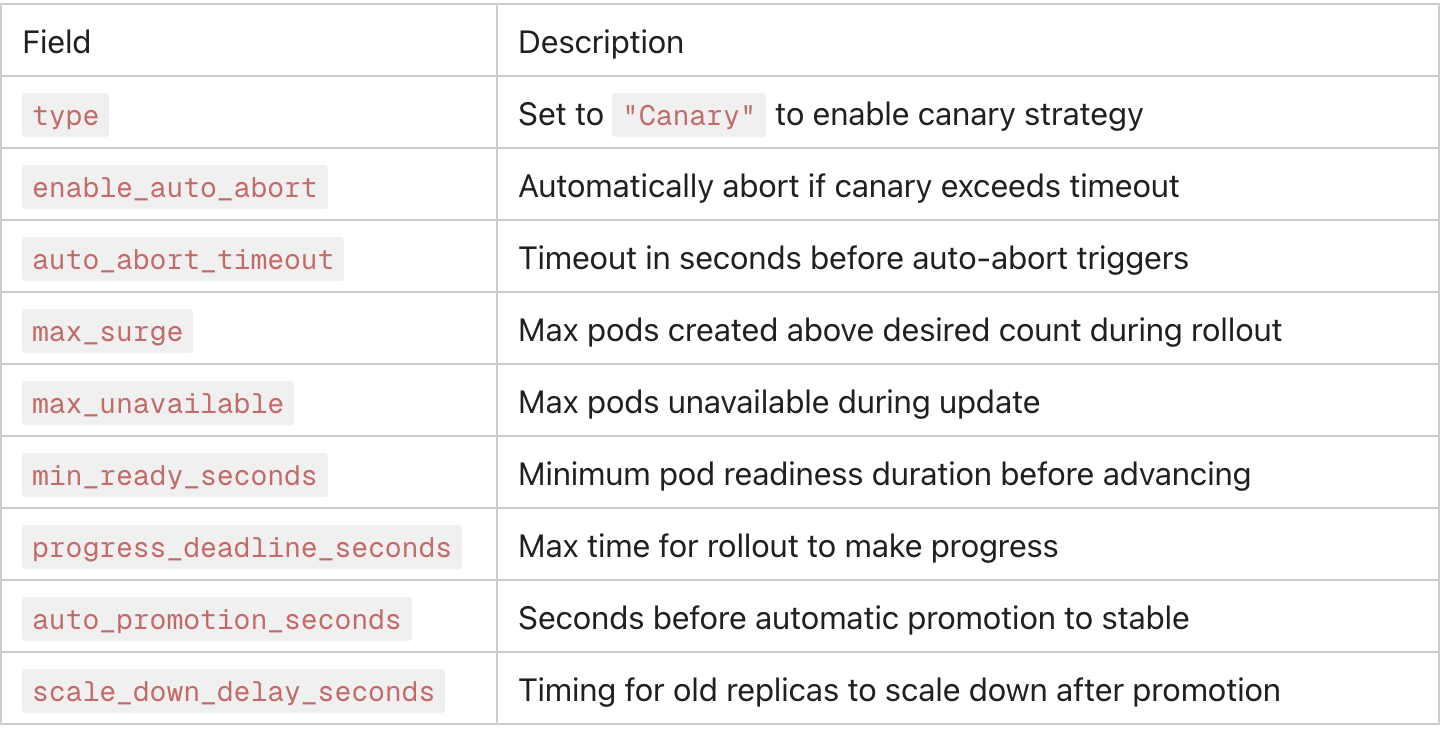
Every key below sits under spec.release.strategy.canary_strategy on the service resource. Options left unset fall back to the default shown.
| Option | Type | Default | Description |
|---|---|---|---|
max_surge | string | unset | Maximum number of pods that can be created over the desired replica count. |
max_unavailable | integer | unset | Maximum number of pods that can be unavailable during the update. |
min_pods_per_replicaset | integer | 1 | Minimum number of pods kept in each ReplicaSet during the rollout. |
min_ready_seconds | integer | 0 | Seconds a new pod must stay ready before it counts as available. |
steps | array | unset | Ordered canary steps (set weight, pause, run analysis). Passed through to the Argo Rollouts steps list. |
enable_manual_rollout | boolean | false | Starts the rollout paused so it advances only when you promote it. |
progress_deadline_seconds | integer | 600 | Maximum time the rollout has to make progress before it is marked failed. |
progress_deadline_abort | boolean | false | Aborts the rollout when the progress deadline is exceeded. |
enable_auto_abort | boolean | false | Attaches an auto-abort analysis template to the rollout. |
auto_abort_timeout | integer | 3600 | Seconds the canary may run before auto-abort fires. Read only when enable_auto_abort is true. |
analysis | object | unset | Analysis templates to run against the canary: template_names and optional args. |
traffic_routing | object | unset | Traffic-routing configuration passed through to Argo Rollouts, for splitting traffic via your ingress or mesh. |
anti_affinity | object | unset | Anti-affinity rules applied to the canary pod set. |
stable_metadata | object | unset | Extra labels and annotations applied to the stable pod set. |
canary_metadata | object | unset | Extra labels and annotations applied to the canary pod set. |
scale_down_delay_seconds | integer | unset | Delay before the old ReplicaSet is scaled down after a successful promotion. |
scale_down_delay_revision_limit | integer | unset | Number of old ReplicaSets kept alive during the scale-down delay. |
abort_scale_down_delay_seconds | integer | 30 | Delay before the canary ReplicaSet is scaled down after an abort. |
revision_history_limit | integer | 3 | Number of old ReplicaSets retained for rollback. |
rollback_window_revisions | integer | unset | Number of revisions eligible for a fast rollback. |
successful_run_history_limit | integer | 10 | Number of successful analysis runs kept in history. |
unsuccessful_run_history_limit | integer | 10 | Number of unsuccessful analysis runs kept in history. |
restart_at | string | unset | Timestamp at which the rollout restarts its pods. |
Step 2: Trigger a release
Release the service the way you would any other. Facets initiates the Argo Rollouts controller, which creates the canary pod set alongside the stable set.
Using prompt
Plan a release of service/api to dev in the checkout project, then release it.or
Using command
raptor plan -p PROJECT -e ENVIRONMENT --target service/NAMEraptor create release -p PROJECT -e ENVIRONMENT --target service/NAMEPlan first to see what the release will change, then run it. See Releasing for the rest of the flags.
New to the CLI? Install it first.
- Navigate to your Project → Environment in the Facets UI. Go to Releases and click Trigger Release.
- Select the service resource(s) with canary strategy configured.
- Click Plan to preview the release changes (dry-run).
- Review the plan output and click Apply to begin the canary rollout.
Step 3: Monitor the rollout
During an active canary rollout, monitor progress via:
- Live Insights & Operations dashboard: real-time pod-level metrics (CPU, memory, restart count).
- Kubernetes Dashboard: pod status, events, and deployment progression.
- Kubernetes Events Dashboard: filter events by namespace to track rollout activity.
Watch for:
- Pod restart frequency or CrashLoops in canary pods.
- Elevated error rates or latency from canary traffic.
- progress_deadline_seconds breaches indicating a stuck rollout.
Step 4: Promote or abort
Promote
If the canary is healthy and validated:
- In the Facets UI, navigate to the resource's Live Tab. Click the Promote action.
- This advances the canary version to stable and scales down the old stable pods.
Manual vs. automatic promotion: A canary advances through its configured steps on its own. Set
enable_manual_rollout: trueto start the rollout paused instead, so it only moves forward when you click Promote. The canary strategy has no timed auto-promotion setting;auto_promotion_secondsbelongs to the blue-green strategy.
Abort
If issues are detected:
- Click the Abort action in the UI.
- Argo Rollouts immediately stops the canary rollout and scales the canary pods down, restoring full traffic to the stable version.
Automatic abort: If enable_auto_abort: true and the rollout exceeds auto_abort_timeout seconds, Facets aborts automatically, preventing prolonged exposure to a faulty update.
Canary metadata
You can apply distinct labels and annotations to stable vs. canary pod sets for observability and traffic filtering:
{
  "stable_metadata": {
    "labels": { "track": "stable" },
    "annotations": {}
  },
  "canary_metadata": {
    "labels": { "track": "canary" },
    "annotations": {}
  }
}
This is useful for routing canary traffic through a separate ingress path or for filtering metrics by deployment track in your monitoring stack.
Releases
Releases deploy blueprint changes to a cloud environment via Terraform apply, covering release types, statuses, sign-off, labels, and metadata.
Parallel releases
Parallel releases run multiple non-conflicting selective releases at once in the same environment, across every resource type, with queuing or state-lock handling.