Infrastructure Blueprint
The blueprint is the model of your infrastructure in Facets: a Git-backed graph of resources. Import your existing running infrastructure with Praxis, or build it fresh in the Blueprint Designer.
Everything you deploy starts with a blueprint: the model of your infrastructure. A blueprint is a declarative, Git-backed graph of resources, each one an intent (a database, a service, an ingress) pinned to a flavor that says how it is built. Instead of writing Terraform, you define resources in the blueprint and Facets generates and applies the Terraform for you. One blueprint powers many environments (development, staging, production), each applying its own overrides without forking it.
You create a blueprint in one of two ways.
Import your existing infrastructure
Already running in the cloud? Give Praxis read-only access to the cloud account and it builds the blueprint for you. It discovers every running infrastructural unit, maps each one to a module, and assembles the blueprint in Facets, with no manual modeling and no human intervention.
To then adopt those running resources under Facets-managed Terraform state, see Migrating existing infrastructure.
Build it fresh
Starting from scratch? Assemble the blueprint yourself: add each resource and configure it, wire resources together by linking them through the form or a dollar reference, and add whole groups at once with templates. Control how resources behave across environments with resource types, and protect sensitive ones with critical resources.
Or just describe what you want to Praxis (Facets' AI agentic platform). It drafts the resource definitions, validates them and their references against Facets schemas, and applies them, planning the change for your review before anything deploys. Ask for "a web application with a database and cache" or "a new service in my project", and it assembles the blueprint through conversation, shaping the modules the blueprint is built from where needed.
The Blueprint Designer
The Blueprint Designer renders your whole infrastructure topology as an interactive graph: resources are nodes, dependencies are edges. Drag, drop, and rearrange resources, then commit the changes back to Git, all without leaving the browser. A table view offers a spreadsheet-style alternative for teams that prefer scanning lists over graphs.
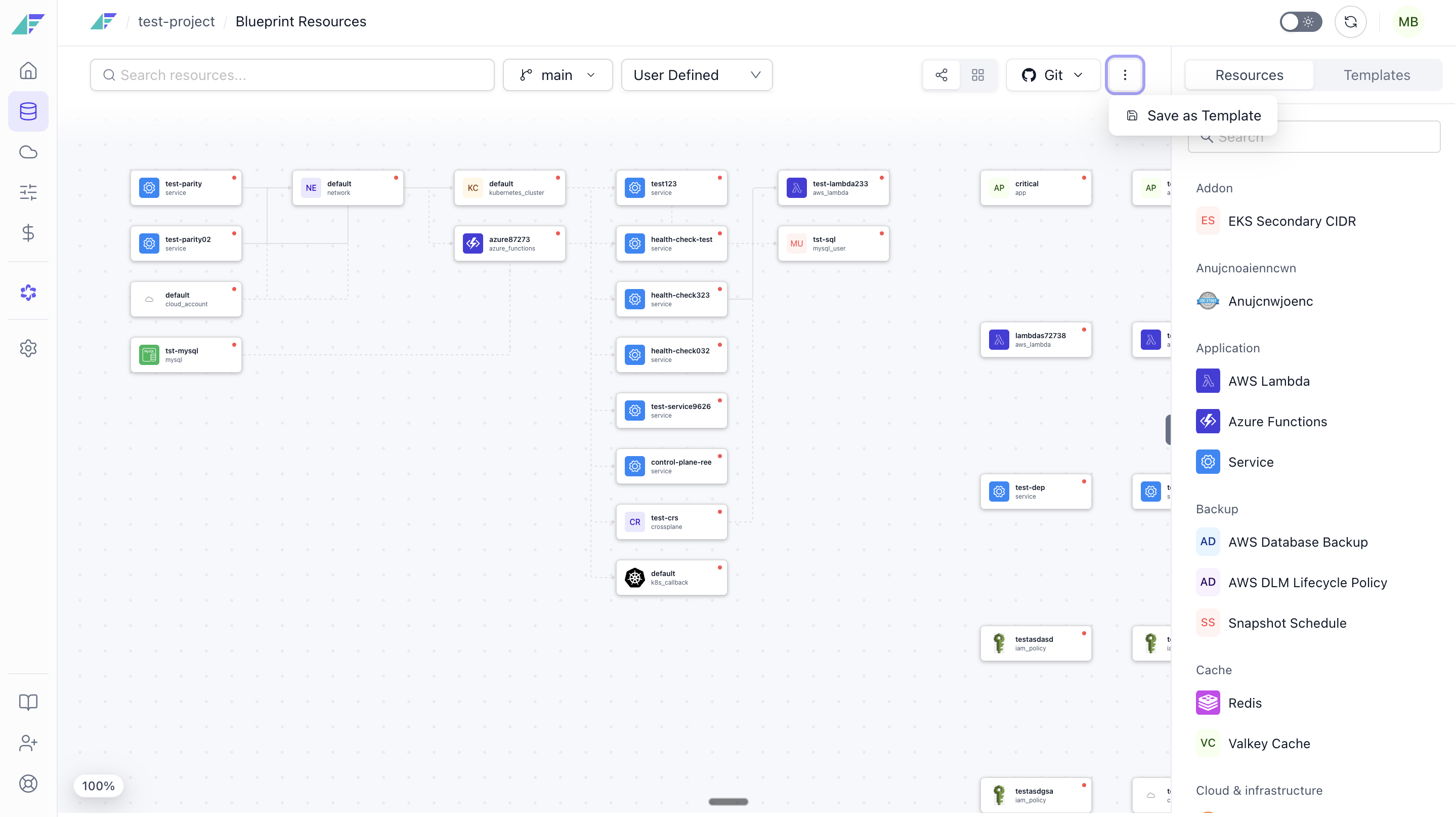
Review a blueprint's hygiene
Ask Praxis to audit an existing blueprint and it returns a prioritised report of issues worth fixing, ranked by severity. It is most useful before a major environment stand-up, or after overrides have piled up. The report calls out:
- Plaintext secrets left in base specs, which leak through blueprint history and inherit into any environment that does not override them.
- Hardcoded ARNs, account IDs, service DNS names, and S3 endpoints that should reference the resource that owns them.
- Override misuse, such as overrides that duplicate base defaults or bake per-environment values into the base spec.
- Helm releases that are candidates for promotion into a custom module.
Each finding comes with the fix to apply. If the review turns up a leaked credential, rotate it before you change the blueprint.
Blueprint structure
A blueprint lives in a Git repository at a configured path, following this layout:
relative-path
├── stack.json                   # Blueprint metadata, variables, and settings
├── deployment/instances/
│   ├── api-service.json         # Resource definition
│   └── worker.json
├── postgres/instances/
│   └── main-db.json
└── redis/instances/
    └── session-cache.json
Each resource file has three logical sections:
- Spec: desired configuration (instance size, replicas, connection settings, port mappings).
- Info: metadata (module version, flavor, enabled/disabled state, artifact CI reference).
- Edges: declared dependencies on other resources; Facets uses these to order deployments and to draw the Designer graph.
Blueprint-level variables and secrets live in stack.json; see Secrets & variables for how to define and reference them.
Git as the source of truth
Every blueprint is backed by a Git repository (created with the project). Every change in the Designer produces a Git commit, so your infrastructure definition is version-controlled, auditable, and reviewable like application code, through your existing branch and pull-request workflows. The repository, branch, and path are set when the project is created and shown in Project Settings.
| Action | Where it happens |
|---|---|
| Create a branch | Blueprint Designer → Branch selector → Add Branch |
| Switch to a branch | Blueprint Designer → Branch selector → select → Apply |
| Add or edit resources on a branch | Blueprint Designer, while on the feature branch |
| View existing pull requests | Blueprint Designer → Git menu → Pull Request |
| Create a pull request | Git menu → Create Pull Request, completes on GitHub/GitLab/Bitbucket |
| Merge PR to the default branch | On your Git provider |
| Blueprint reflects merged changes | Automatically, via webhook-triggered sync |
| Manually force a sync | Git menu → Sync with Git |
Deploy your blueprint
A blueprint is the plan; it runs when you deploy it. Launch an environment to provision its infrastructure, then release the blueprint into that environment. The same blueprint deploys to as many environments as you need, each with its own overrides.
GitOps for Overrides
Enable GitOps for Overrides in Facets to manage environment-specific overrides from a Git repository, with two-way UI sync and an option to restrict UI changes.
Adding & Editing a Resource
Step-by-step guide to adding, editing, and configuring resources in the Facets Blueprint tab using graph mode, table mode, and the JSON editor.