


Most teams ship to Kubernetes through a chain of tools: a CI system builds an image, a registry stores it, Helm or Kustomize describes how it runs, and a GitOps tool or a deploy job puts it on the cluster. Each part is well understood. Getting them to work together, for every service and every environment, is where the effort goes.
This post explains how Kubernetes CI/CD works, step by step, which tools teams use, and the best practices that keep it safe. It ends with the part most guides skip: where Kubernetes CD breaks down as you grow, and what to do about it.
What CI/CD means on Kubernetes
Definition
CI (continuous integration) builds and tests every change and packages it as a container image. CD (continuous delivery or deployment) takes that image, its configuration and the infrastructure it needs, and gets them running in each environment, from test to production.
Four building blocks show up in almost every Kubernetes CI/CD setup:
- Containers and registries. A container packs an app with its dependencies, so it runs the same way everywhere. A registry such as Docker Hub, Amazon ECR, Google Artifact Registry or Azure Container Registry stores the images that CD deploys.
- Configuration. Helm packages Kubernetes manifests as charts with values per environment. Kustomize layers environment changes over a shared base.
- Git. Code and configuration live in Git. A push or a merge starts the pipeline.
- Security checks. Image scanners such as Trivy or Clair block known vulnerabilities before an image reaches a cluster.
A Kubernetes CI/CD pipeline, step by step
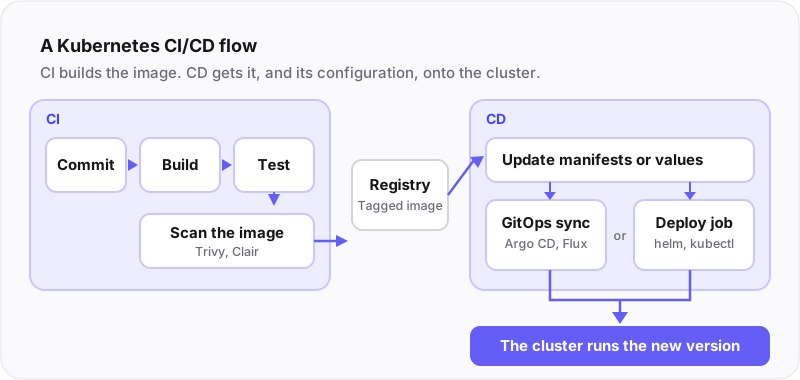
A typical pipeline runs these steps:
- Commit. A developer, or a coding agent, pushes a change and opens a pull request.
- Build. CI builds the container image.
- Test. Unit and integration tests run against the build.
- Scan. An image scanner checks for known vulnerabilities.
- Push. CI tags the image with a version and pushes it to the registry.
- Update manifests. The new image tag goes into the Kubernetes manifests or Helm values, usually as a commit to a configuration repository.
- Sync or deploy. A GitOps tool such as Argo CD or Flux sees the change and syncs the cluster. Without GitOps, a deploy job runs
helm upgradeorkubectl apply.
For a first setup, a local cluster such as Minikube or Kind is enough to practice. For production, most teams use a managed service: GKE, EKS or AKS.
Kubernetes CI/CD tools
These are the tools most teams pick from. Many setups combine two or three.
- Jenkins and Jenkins X. Jenkins is an open-source automation server with a Kubernetes plugin. Jenkins X builds on it with Kubernetes-native pipelines, preview environments and GitOps promotion.
- GitHub Actions. CI built into GitHub, with workflows defined in YAML next to the code.
- GitLab CI/CD. Pipelines defined in the repository, with runners, a container registry and Kubernetes integration in one product.
- Argo CD. GitOps continuous delivery: it watches Git repositories and syncs clusters to the declared state, with a web UI and automatic pruning.
- Flux. A GitOps toolkit that syncs clusters from Git and can update image tags on its own.
- Helm. The package manager for Kubernetes: charts, values and release history.
- Kustomize. Template-free configuration overlays, built into kubectl.
- Argo Rollouts. Progressive delivery: canary and blue-green rollouts with automated analysis.
GitOps for Kubernetes deployments
GitOps is the most common way to run the CD half on Kubernetes. The desired state of each cluster lives in a Git repository: the manifests, the Helm values and the image tags. A GitOps agent inside the cluster, such as Argo CD or Flux, watches that repository and syncs the cluster until it matches.
This changes how deployments work in three ways:
- Every change is a commit. A deployment is a pull request to the configuration repository, so it gets the same review as code.
- The cluster pulls. CI never needs credentials to the cluster. The agent inside the cluster pulls the change, which keeps cluster access out of CI.
- Drift gets corrected. If someone edits the cluster by hand, the agent notices that it no longer matches Git and can put it back.
GitOps has limits too. It covers what runs inside the cluster. The database, the queue and the cloud account the app needs usually come from a separate Terraform pipeline, and someone has to keep the two in step. The next sections come back to this.
Kubernetes CI/CD best practices
- Make Git the source of truth. Define the desired state of each cluster in Git and make every change through a commit. You get version history, review and easy reverts.
- Version every image. Tag images with a commit SHA or a release version. Never deploy
latest. - Test the rollback path. Kubernetes Deployments keep revision history, so a rollback is one command. Practice it before you need it.
- Scan images. Run Trivy or Clair in CI and block images with critical vulnerabilities.
- Use RBAC. Give people, CI jobs and GitOps agents only the permissions they need in each namespace.
- Keep secrets out of Git. Store them in Kubernetes Secrets backed by a secret manager, encrypt them at rest and limit who can read them.
- Release progressively. Use canary or blue-green releases for risky changes. Version the Secrets and ConfigMaps too: blue-green deployments break when configuration changes in place.
- Watch every release. Prometheus and Grafana for metrics, logs in one place, and alerts that name the release that changed things.
Where Kubernetes CD breaks down
The steps above work well for one service. They get hard as the number of services and environments grows:
- One CD pipeline per project. Every service gets its own pipeline, or its own copy of a template. Each one must be owned, updated and secured.
- Privileged pipelines. A CD pipeline needs access to the cluster and often to the cloud account. So only a few experts may change it, and everyone else files a ticket.
- The cluster is not the system. The app syncs, but its database, queue, DNS record and cloud account come from somewhere else, usually a Terraform pipeline run by another team.
- Copied wiring. Connection details move by hand from Terraform outputs into Helm values, one environment at a time. A typo here is an outage later.
If pipelines are too risky for developers, they are too risky for infrastructure agents. The pipeline is the bottleneck for both.
Why AI makes it urgent
AI coding assistants made the CI side fast. Each engineer now sends more changes, and coding agents open pull requests of their own. Every one of those changes then waits on CD: on a pipeline change, an environment or someone with cluster access.
An agent also needs a check before its change runs. An AI agent can only run what it can verify. For code, the compiler and the tests give it that check. A CD pipeline gives it nothing: the first sign of a wrong change is a broken environment.
CD without a pipeline per project
The fix is to keep what works, your CI and the GitOps idea of a declared state, and to stop writing a CD pipeline for each project. Declare the whole system once, including the infrastructure around the cluster, and let one orchestrator plan, check and release every change.
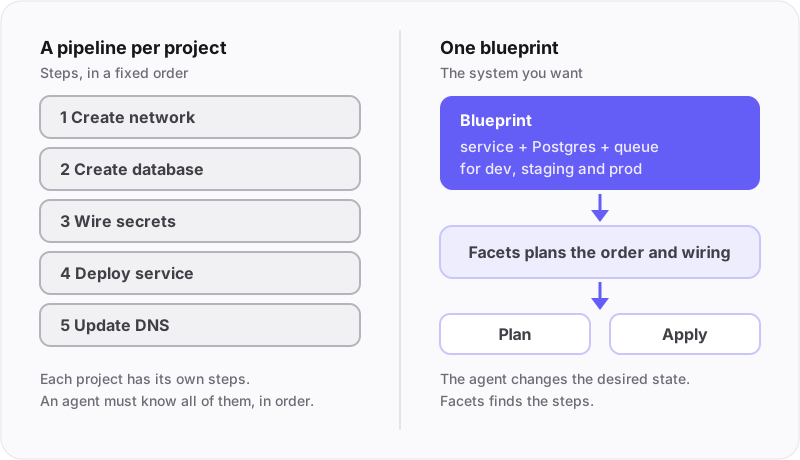
Your CI still builds and tests the code. It pushes the image to your registry and registers it with Facets as an artifact (CI/CD and container images). From there, declaration replaces the pipeline.
One blueprint declares the services, the databases and how they connect. Facets generates the Terraform and Helm, wires the outputs of one module to the inputs of the next in each environment, and shows the plan. Guardrail policies and approval rules check each release before it runs. Canary releases run on Argo Rollouts, and a wrong change rolls back per resource. A release can start from your CI, by hand or on a schedule, and the CI/CD workflow routes each image to the right environments and promotes it.
Apps that already use Helm charts or Argo CD YAMLs can be brought over by mapping their values to a service.
Proof: Niyo ships about 2,000 releases per month (around 60 a day) on Facets.
Summary
Kubernetes CI/CD is a well-known toolchain: CI builds and tests, a registry stores images, Helm or Kustomize configures them, and GitOps or a deploy job puts them on the cluster. The best practices above keep it safe for one service. As services, environments and agents multiply, the per-project CD pipeline becomes the bottleneck. Keep your CI, declare the system once, and let one orchestrator check and release every change.
To see it on your own clusters, book a demo. For the thinking behind it, read Why Facets.
Read next: Kubernetes fleet management, blue-green deployments and versioned configuration and GitOps at scale.