


Every team that runs infrastructure for long enough meets the same bug. A change passes every test in staging, then fails in production, and the code is not the cause. After hours of debugging, someone finds the real reason: the two environments are no longer the same. That gap is infrastructure drift.
What is infrastructure drift?
Definition
Infrastructure drift
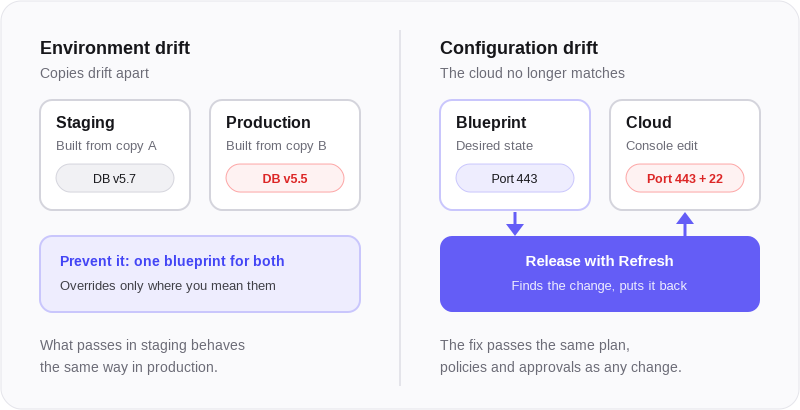
Infrastructure drift is the gap between the infrastructure your code describes and the infrastructure that actually runs. It comes in two kinds. Environment drift is when environments that should match, such as staging and production, no longer do. Configuration drift is when a cloud resource no longer matches its code, because someone changed it outside the normal process.
The two kinds often appear together, and both break the same promise: what you tested is what you run.
An example: the staging setback
Alex, a developer, builds a new feature for a web application. The local environment runs version 5.7 of the database the application depends on, and the team believes that development, staging and production all run 5.7 too.
The feature uses a function that exists only in 5.7. It works locally, and Alex commits the code.
The code reaches staging and fails. Nobody told the developers that an ops engineer downgraded the staging and production databases to 5.5 while fixing an urgent issue. The team spends hours on the code before anyone checks the database version. Then the arguments start: update staging, or refactor the feature?
The code was fine. The environments had drifted, and nothing in the process said so.
What causes infrastructure drift
Drift rarely comes from one big mistake. It builds up from small, reasonable decisions:
- Manual console changes. Someone fixes a setting directly in the cloud console because it is faster than a pull request.
- Hotfixes during incidents. A change made at 2AM to stop an outage never makes it back into the code.
- Workarounds that stay. A temporary fix becomes permanent. If a workaround exists, expect it to be used again.
- Partial automation. Some resources are in Terraform and some are not, so the code describes only part of the system.
- A copy per environment. Each environment has its own Terraform project or its own pipeline. The copies start identical and drift apart with every change applied to one but not the others.
What drift costs
- Wasted debugging. Teams chase code bugs that are really environment differences, as Alex's team did.
- Failed releases. A change that passed in staging fails in production, or worse, half-applies.
- Security gaps. An update applied in one environment and missed in another leaves a system exposed, and a port opened by hand stays open.
- Audit findings. In regulated industries, a resource that differs from its approved definition is a finding, whatever the reason.
Why drift matters more with AI agents
AI assistants and infrastructure agents now write and apply infrastructure changes. An agent plans a change against what it believes exists. If production has drifted from the code, the agent's plan is built on wrong facts, and it may undo a hotfix nobody recorded or fail in a way nobody expects.
Agents also raise the volume of changes. More changes per week means more chances for a manual fix to collide with an automated one. A team that tolerated a little drift when it shipped weekly cannot tolerate it when people and agents ship every day.
How to detect drift
Detection compares what runs with what the code says.
- Terraform plan with refresh.
terraform planrefreshes state from the cloud before it plans, so changes made outside Terraform appear as proposed changes.terraform plan -refresh-onlyshows only what changed outside Terraform, without proposing to undo it. - Scheduled plans. Run a plan on a schedule in CI with
-detailed-exitcode. It returns 2 when the plan finds changes, so you can alert on it. - Cloud configuration tools. Your cloud provider's configuration and policy services record changes to resources and can flag ones that break a rule.
There are two broad approaches. A continuous watcher checks all the time and alerts quickly, but someone still has to decide what to do with each alert. A check at release time finds drift whenever a release runs, and the fix goes through the same process as any other change. Many teams combine a schedule of releases with the check at release time, so drift is found within a known window and fixed the normal way.
What to do when you find drift
Every drifted resource needs one decision: was the change right?
- If the change was wrong, such as a port opened by hand, apply the code again. The plan shows what it will put back, and the resource returns to its definition.
- If the change was right, such as a hotfix that stopped an outage, adopt it. Update the code to match, review it like any other change, and release it. Then the next plan shows no difference.
- If nobody knows, find out before you apply anything. A release history or a cloud audit log usually shows who made the change and when.
Do not let drift sit unresolved. Each unexplained difference makes the next plan harder to read, and a plan that always shows a few "expected" changes trains people to stop reading it.
How to prevent drift
Detection tells you drift happened. Prevention makes it rare:
- Keep one declared model. Describe the whole system, services, databases, networks and how they connect, in one model in Git. If it is not in the model, it should not exist.
- Send every change through a release. Changes reach an environment only through the release process, with a plan you can read. A fix during an incident goes through it too, so it lands in the model and the record.
- Build every environment from the same model. Set the few intended differences, such as more replicas in production, as explicit overrides. Everything else follows the model, so environments cannot quietly diverge.
- Release on a schedule. Regular releases bring each environment back to the model and keep the window for drift short.
- Protect critical resources. Require a separate permission to delete, disable or change the protected fields of resources such as production databases.
- Limit console write access. Give people read access to the console and write access through the release process.
How Facets handles drift
In Facets, every environment is built from one blueprint, with explicit overrides where an environment should differ. Environments built from the same blueprint do not drift apart.
Facets does not watch for drift all the time. A release with Refresh finds changes made outside Facets, and applying that release puts the resources back to match the blueprint (Drift: changes made outside Facets). Scheduled releases refresh unless one refreshed in the past 12 hours, so a release schedule also sets how often drift is checked.
The fix is a normal release. It passes the same module contracts, guardrail policies and approvals as any other change, and it stays in the release history. Critical resources need a separate permission to delete, disable or change their protected fields.
The next step is auto-healing with a record: when an environment no longer matches its blueprint, an agent brings it back through a normal release, with the same checks and the same audit trail (What comes next).
Consistency across environments is also what lets teams trust a release. Kadam Jeet Jain, Co-Founder and CTO of Treebo, put it this way:
We run multiple production clusters that need identical specs. Facets made them all look the same - no more infrastructure differences during troubleshooting.
"
Treebo reduced production issues by 70%.
Conclusion
Drift comes back whenever a change can reach an environment without passing through the model. Detection with Terraform plans finds it. One declared model, explicit overrides and a release for every change keep it rare. With AI agents shipping more changes, the check before every change matters more each month.
To go deeper on the model, read What is an infrastructure blueprint? and Implementing GitOps at scale. Why Facets explains how one model makes environments a commodity. To see it on your own stack, book a demo.