Environment-Level Management
View and manage secrets and variables across all environments from one interface, comparing values and spotting default versus custom overrides at a glance.
Facets provides a structured way to handle application configurations across different environments.
Multi-environment view
View and manage variable configurations across all environments from a single interface. The multi-environment view shows:
- All variables defined at project or environment level
- Current value for each environment (or indication that it's unset)
- Status indicators showing whether each environment uses the default or a custom override
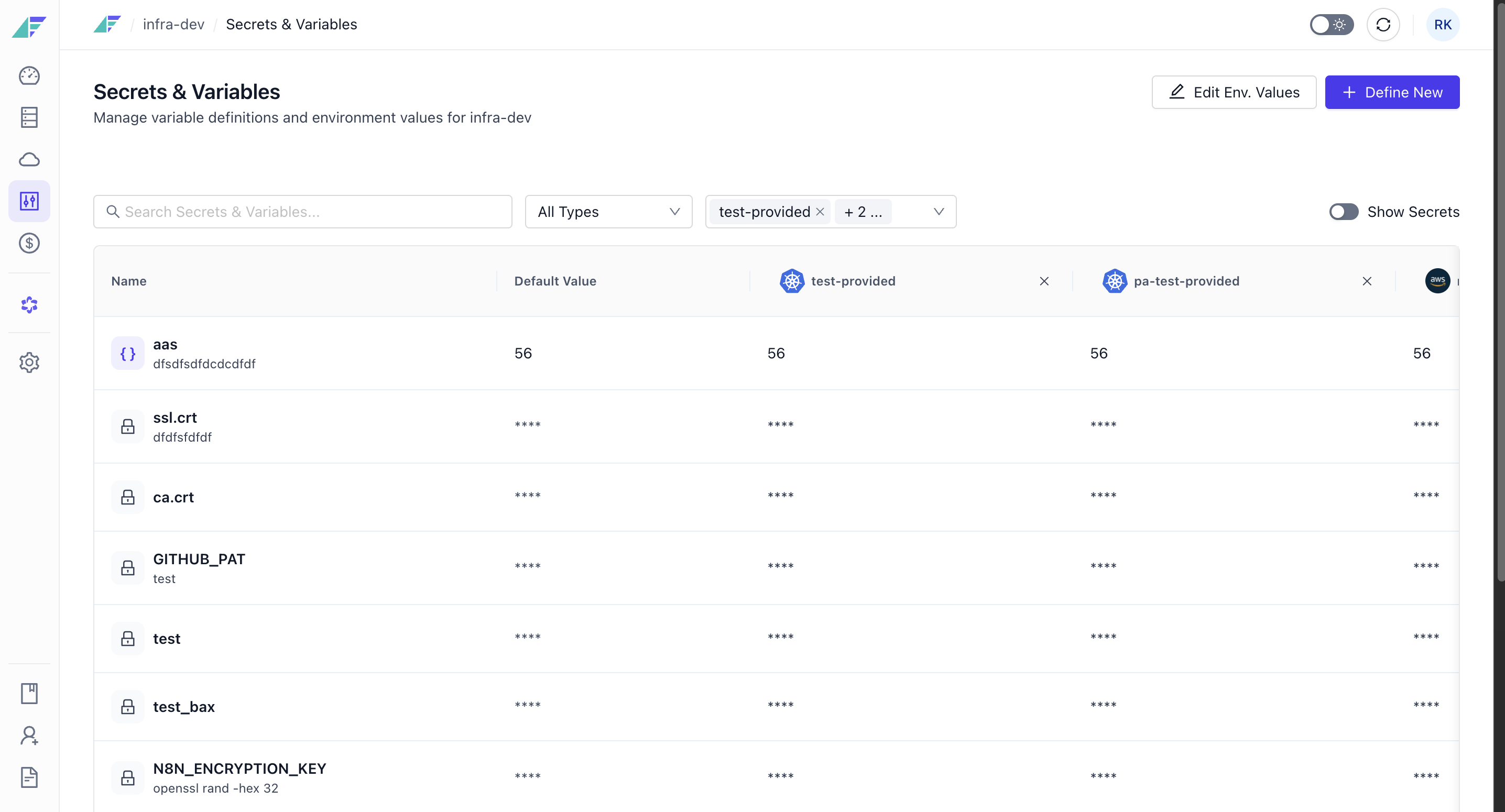
This centralized view eliminates the need to navigate between environments to compare configurations or identify inconsistencies.
Editing values for an environment
Beyond comparing values across environments, you can edit many variable and secret values for a single environment in one workflow, instead of updating each one individually.
To edit values for an environment:
Using prompt
Set API_URL to https://api.prod.com in prod and https://api.staging.com in staging, for myproject.or
Using command
# Several environments in one call
raptor set variable API_URL -p myproject \
    --env-values prod=https://api.prod.com,staging=https://api.staging.com

# What one environment resolves to
raptor get variables -p myproject -e production
Secret values are masked. Add --show-secrets to reveal them, which needs -e to name the environment and the VIEW_SECRETS permission for it.
New to the CLI? Install it first.
- From the multi-environment view, click Edit Env. Values.
- Select the environment whose values you want to update.
- Edit values directly in the table using Edit env value, updating one or more entries as needed.
- To make several changes at once, switch to the JSON editor and edit the values as raw JSON instead of using the table.
- Reveal secret values as needed. Secret values are fetched only when you choose to reveal them, and only for environments where you have access to view secrets.
- Save your changes, or discard them to revert to the values that were in place before you started editing.
Facets tracks unsaved changes while you work in this view, so you can discard them at any point before saving without affecting the existing values.
Editing environment values requires a different permission than defining new variables and secrets at the project level. See the permission matrix on the Project-Level Secrets & Variables page for details.
Troubleshooting
| Problem | Solution |
|---|---|
| The JSON editor shows an error and won't let you save | The pasted JSON is invalid. Check for missing commas, unmatched brackets, or trailing commas, then correct the JSON before saving. |
Related
- Project-Level Secrets & Variables - Define variables and secrets and manage project-level defaults
- Resource Variables - Override variable values for a single resource
- Secrets Backend Integration - How secret values are stored and encrypted
Project-Level Secrets & Variables
Define secrets and variables once at the project level as a single source of truth, auto-inject them across resources, and override values per environment.
Resource Variables
Define resource-specific variables at the blueprint level as defaults, then override them per environment with a clear hierarchy of inherited and custom values.