Project-Level Secrets & Variables
Define secrets and variables once at the project level as a single source of truth, auto-inject them across resources, and override values per environment.
Define a variable or secret once at the project level as the single source of truth, then let Facets inject it across resources and override its value per environment. No environment-specific files to maintain, and no secrets in version control.
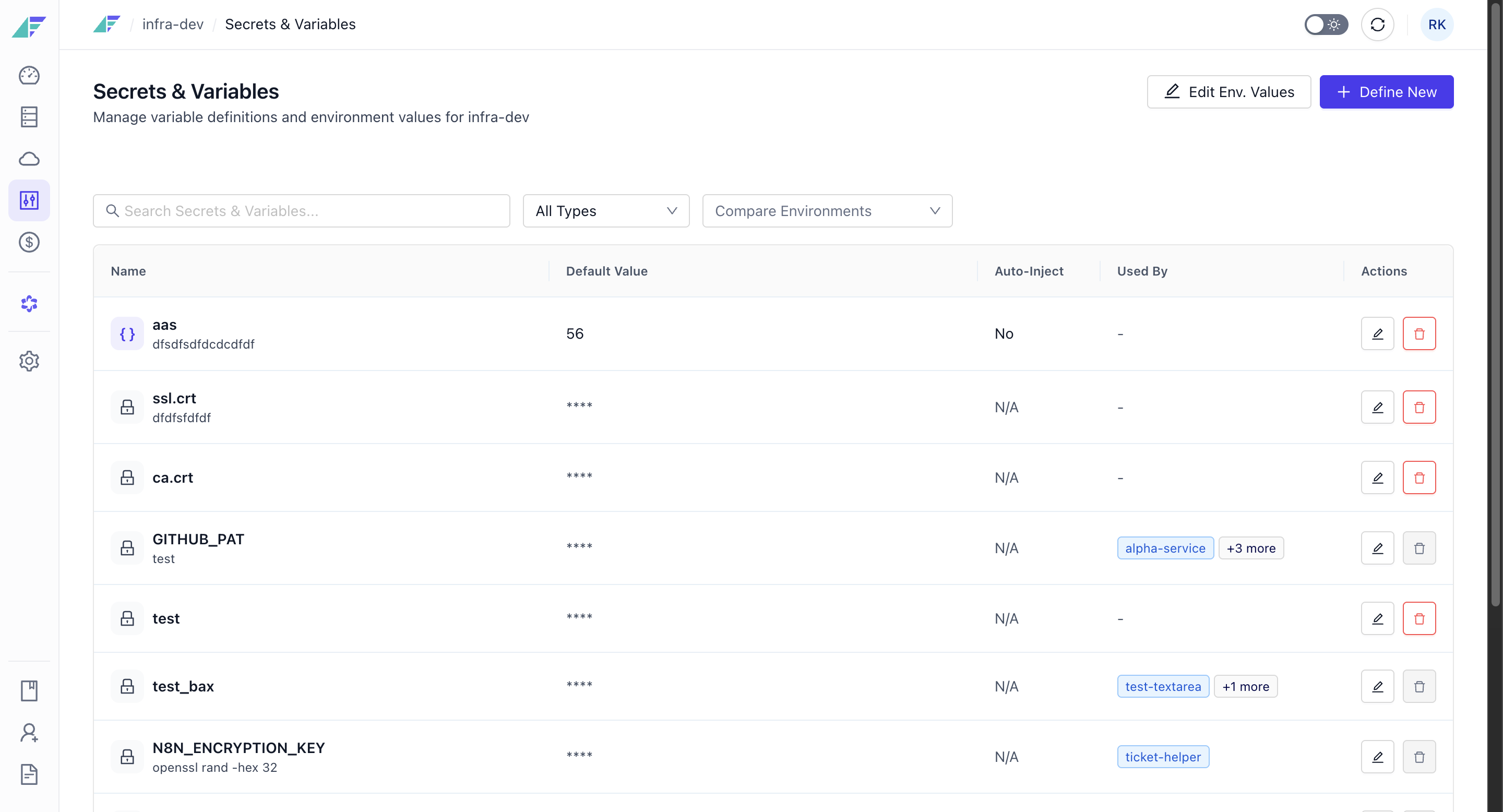
Variables
- Project-Level Definition: Define variables once at the project level as your source of truth
- Key-Value Storage: Each variable has a key and value defined at the blueprint level
- Auto-Injection: Mark variables for automatic injection across all resources
- Resource-Level Flexibility: Create aliases for specific resource usage when needed
- Environment Overrides: Override any variable at environment level without changing the source
Secrets
- Secure by Design: Only secret keys are stored at project level
- Environment-Level Values: Secret values are stored securely in the environment's secret manager
- Flexible Access: Choose between auto-injection or selective usage through aliases
- Safe Storage: No sensitive data in version control
- Easy Rotation: Update secret values at environment level without touching the blueprint
Using secrets and variables
Note: Select theAuto Inject checkbox to automatically add (auto-inject) the key-value pair to all the resources in the Blueprint.
Variable status and overrides
Each variable displays a status indicator showing its current state:
| Status | Definition |
|---|---|
| DEFAULT | Environment uses the project-level default value (variables only, secrets have no project-level default) |
| OVERRIDDEN | Environment has a custom value that differs from default |
| NOT_SET | Variable key exists but no value is configured for this environment |
| NO_ACCESS | You lack VIEW_SECRETS permission to view this secret value |
The multi-environment view displays all these statuses at once, making it easy to identify which environments have custom configurations and which inherit defaults.
Secret values are masked as **** in the table by default. Reveal a secret's value for a specific environment using the eye-icon toggle in that environment's column. This toggle requires the VIEW_SECRETS permission scoped to that environment, if you lack it for a given environment, the toggle stays disabled there and the status for that environment shows as NO_ACCESS.
Where a variable is used
Using prompt
What still uses DB_PASSWORD in myproject?Which variables and secrets in myproject are unused?or
Using command
# Every resource referencing one name
raptor get variable-usages DB_PASSWORD -p myproject

# Everything in the project, including the names nothing references
raptor get variable-usages -p myproject
With no name, the listing covers every variable and secret in the project and the ones nothing references come back with no usage, which makes them the safe deletions. Usage is reported at two scopes: a blueprint row is a resource in the project blueprint, so the reference reaches every environment that resource is deployed to, while an env/NAME row is a resource that exists only in that one environment.
New to the CLI? Install it first.
The Used By column shows how many resources currently consume a variable or secret. Select it to open a modal listing every consuming resource, with its Resource Type, Resource Name, Blueprint, and Environment, so you can confirm whether the reference is project-level or scoped to a specific environment.
To find what is no longer needed, filter the table to show only the secrets and variables nothing references.
Editing a variable or secret
Using prompt
Point API_ENDPOINT at https://api.v2.example.com in myproject.or
Using command
# Define one. --global auto-injects it into every resource
raptor create variable API_ENDPOINT --value https://api.example.com --global -p myproject

# Change the project default, the description, or the auto-inject flag
raptor set variable API_ENDPOINT --value https://api.v2.example.com -p myproject
raptor set variable API_ENDPOINT --description "New API endpoint" -p myproject
raptor set variable APP_NAME --global=true -p myproject

# List what the project has. Secrets come back masked
raptor get variables -p myproject
raptor get variables -p myproject --type secret
--value is rejected for a secret, because a secret has no project-level default. Its value is set per environment with --env-values, one environment at a time, even when the value is the same everywhere.
New to the CLI? Install it first.
Select Edit on a row to open a drawer where you can update the description, the project-level default value (variables only, secrets have no project-level default), and per-environment values together. Secret values can be revealed for editing per environment, gated by the same VIEW_SECRETS permission described above.
Referencing a variable or secret
Once a variable or secret is defined at the project level, reference it from a resource's configuration instead of duplicating the value.
- Locate the variable or secret in the table.
- Select Copy $ Reference on that row.
- Facets copies a template expression to your clipboard, for example
${blueprint.self.variables.<name>}for a variable, or${blueprint.self.secrets.<name>}for a secret. - Open the module or resource configuration field where the value belongs, and paste the copied expression.
- For fields that support it, use the reference autocomplete field directly instead of copy-pasting, start typing and select the variable or secret by name from the suggestions, which resolves to the same reference expression.
You can also perform this operation programmatically. See the API Reference for details.
Deleting a variable or secret
Using prompt
Delete the OLD_API_KEY variable from myproject.or
Using command
raptor delete variable OLD_API_KEY -p myprojectNew to the CLI? Install it first.
Select Delete Variable on a row to remove a definition that's no longer needed.
Facets blocks deletion while a variable or secret is still referenced by any resource. The Delete Variable action stays disabled, with a tooltip explaining how many resources still use it. Remove all references before deleting.
Permissions
Different actions on this page require different permissions, checked independently:
| Action | Required Permission | Scope |
|---|---|---|
| Define new variables/secrets and edit project-level fields (description, default value) | STACK_WRITE | Project |
| Edit per-environment values (Edit Env. Values) | ENVIRONMENT_CONFIGURE | Global, or scoped to a specific environment |
| Reveal a secret's actual value | VIEW_SECRETS | Scoped to a specific environment |
A user can hold one of these permissions without the others, for example, someone with ENVIRONMENT_CONFIGURE but not STACK_WRITE can edit environment values but can't define new variables.
Troubleshooting
| Problem | Solution |
|---|---|
| Creating a variable or secret fails because the name already exists | Choose a different name, or edit the existing definition instead of creating a new one. |
| A bulk create or update request is rejected for duplicate names | Each variable name must be unique within a single request. Remove duplicates and resubmit. |
| The project or a referenced variable can't be found | Confirm the project and variable name are correct. The definition may have been deleted or renamed. |
| Saving fails with an access-denied error | You lack STACK_WRITE for project-level fields, or ENVIRONMENT_CONFIGURE for one or more of the environments you're writing to. Ask a project admin for access. |
| The page shows "Failed to load variables" | The initial data fetch failed. Reload the page; if it persists, check your connection or contact your administrator. |
| The page shows "Invalid Project" | Facets couldn't resolve a project from the current URL. Navigate to the project from its dashboard instead of a direct link. |
Related
- Environment-Level Management - Compare values across environments and bulk-edit overrides
- Resource-Level Variables - Override a variable's default for a single resource
- Linking resources - Wire one resource's output into another with the form or $ referencing
- Secrets Backend Integration - How secret values are stored and encrypted
- API Reference - Programmatic access to variables and secrets
Secrets & variables
Manage secrets and variables across services, environments, and projects, secure storage with per-environment overrides.
Environment-Level Management
View and manage secrets and variables across all environments from one interface, comparing values and spotting default versus custom overrides at a glance.