Azure
Set up your self-hosted Facets control plane in Azure, covering service account requirements and the AKS, VNet, PostgreSQL, and supporting resources deployed.
Run the Facets control plane in your own Azure subscription. It runs on Azure Kubernetes Service (AKS), and the Facets team launches it for you after a short discussion, typically about 60 minutes once your service-account details are submitted.
Prerequisites
- An Azure subscription. A dedicated subscription is recommended for the Facets control plane.
- A service account with Owner access to the Azure subscription, so the Facets team can set up and manage your control plane.
What Facets deploys
The following architecture shows how the Facets control plane is deployed in a customer Azure subscription.
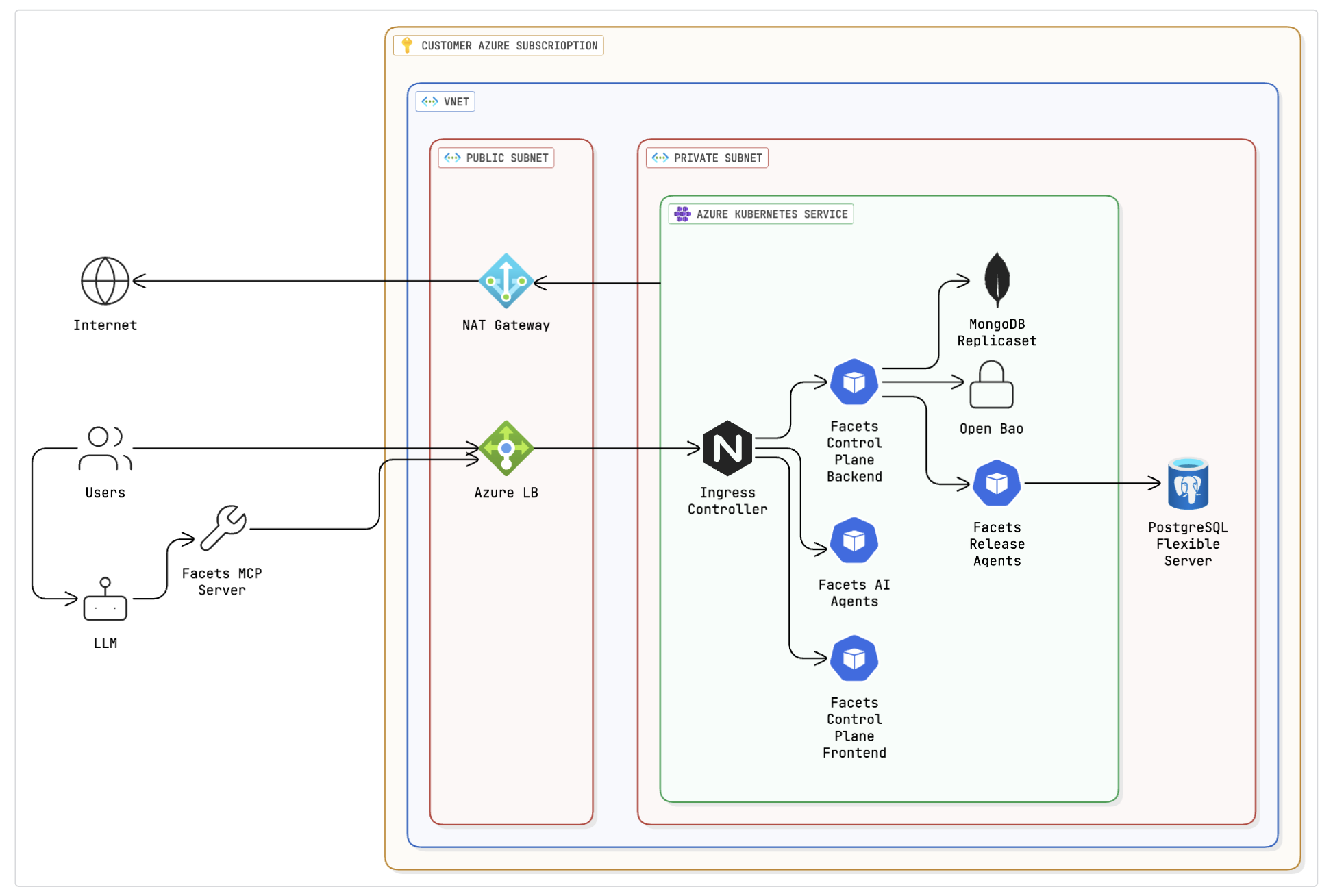
The control plane in Azure consists of the following resources.
Networking
- Virtual Network (VNet): A dedicated virtual network for the Facets control plane.
- Subnets:
- Public Subnet: Hosts the NAT Gateway and Azure Load Balancer.
- Private Subnet: Hosts the AKS cluster and associated services.
- NAT Gateway: Provides outbound internet connectivity for resources in the private subnet.
- Azure Load Balancer: Internet-facing load balancer for routing external traffic.
Compute
- Azure Kubernetes Service (AKS):
- Cluster: An AKS cluster with encryption at rest.
- Nodes: AKS nodepool configured with 8 vCPUs, 32GB RAM, and a 100GB root volume.
- Workloads:
- Ingress Controller
- Facets Control Plane Backend
- Facets Control Plane Frontend
- Facets Release Agents
- MongoDB Replicaset
- OpenBao (an open-source secrets management engine)
Data stores
- PostgreSQL Flexible Server: Managed database for application data.
- MongoDB Replicaset: Deployed in AKS for configuration and state management.
- OpenBao: Secrets management deployed in AKS.
Steps
- Get a demo: To get started, request a demo by contacting the Facets team. The team will understand your requirements and help you get started.
- Submit service account details: You will receive a form to submit your service account details. The service account must have Owner access to the Azure subscription. This step is crucial for the Facets team to set up and manage your control plane.
- The Facets team launches the control plane: After receiving your service account details, the Facets team launches the control plane in Azure. Your control plane will be ready to use within approximately 60 minutes.
- Welcome email with control plane URL: You will receive a welcome email with your personal control plane URL, along with a username and password reset link. Use these to log into the control plane and start using Facets.
Deployment options
You can choose any Azure Region and Availability Zones for deploying the control plane. Communicate your preferences with the Facets team. Request any changes in resource sizing by email to the Facets team.
Next steps
Your control plane starts with no IaC modules, so the first thing to do is import a project type, which loads the official modules and output types for Azure in one command. After that you can create a project and build its blueprint.
GCP
Set up your self-hosted Facets control plane in GCP, covering required APIs and permissions, GKE and networking resources, Secret Manager modes, and Shared VPC.
Install Praxis CLI
Install the Praxis CLI on macOS or Linux, log in once to cover both praxis and raptor, and check the install from your terminal.