AWS
Set up your self-hosted Facets control plane in AWS, covering the CloudFormation IAM role, the EKS, VPC, S3, and DynamoDB resources deployed, and backups.
Run the Facets control plane in your own AWS account. It runs on Amazon EKS, and the Facets team launches it for you after a short discussion, typically in about 60 minutes once your IAM role is in place.
Prerequisites
An AWS account with sufficient service quotas to accommodate the resources listed in What Facets deploys.
What Facets deploys
To run your control plane in AWS, Facets deploys the following AWS resources:
- VPC: A dedicated Virtual Private Cloud for the Facets control plane.
- Subnets:
- Private Subnets: One in each of two Availability Zones (AZs) with a corresponding NAT Gateway for each.
- Public Subnets: One in each of two AZs, connected to a single Internet Gateway (IGW).
- EKS:
- Cluster: An Amazon Elastic Kubernetes Service cluster with secret encryption with KMS.
- Nodes: EKS nodes configured with 8 vCPUs, 32GB RAM, and a 100GB root volume.
- Load Balancer: Two internet-facing Elastic Load Balancers (ELB).
- Certificates: Two ACM (AWS Certificate Manager) certificates.
- Storage:
- S3 Buckets: Three AES encrypted S3 buckets for:
- Logging (no public access)
- Internal Artifacts Storage (no public access)
- Infrastructure as Code (IAC) State storage (no public access)
- EBS: KMS encrypted EBS volumes for metadata, metrics, and hot tier logs.
- S3 Buckets: Three AES encrypted S3 buckets for:
- DynamoDB: A table for Infrastructure as Code (IAC) state locking.
- Secret Management: Any sensitive data submitted to your control plane is stored in an AWS Secrets Manager secret.
Architecture overview
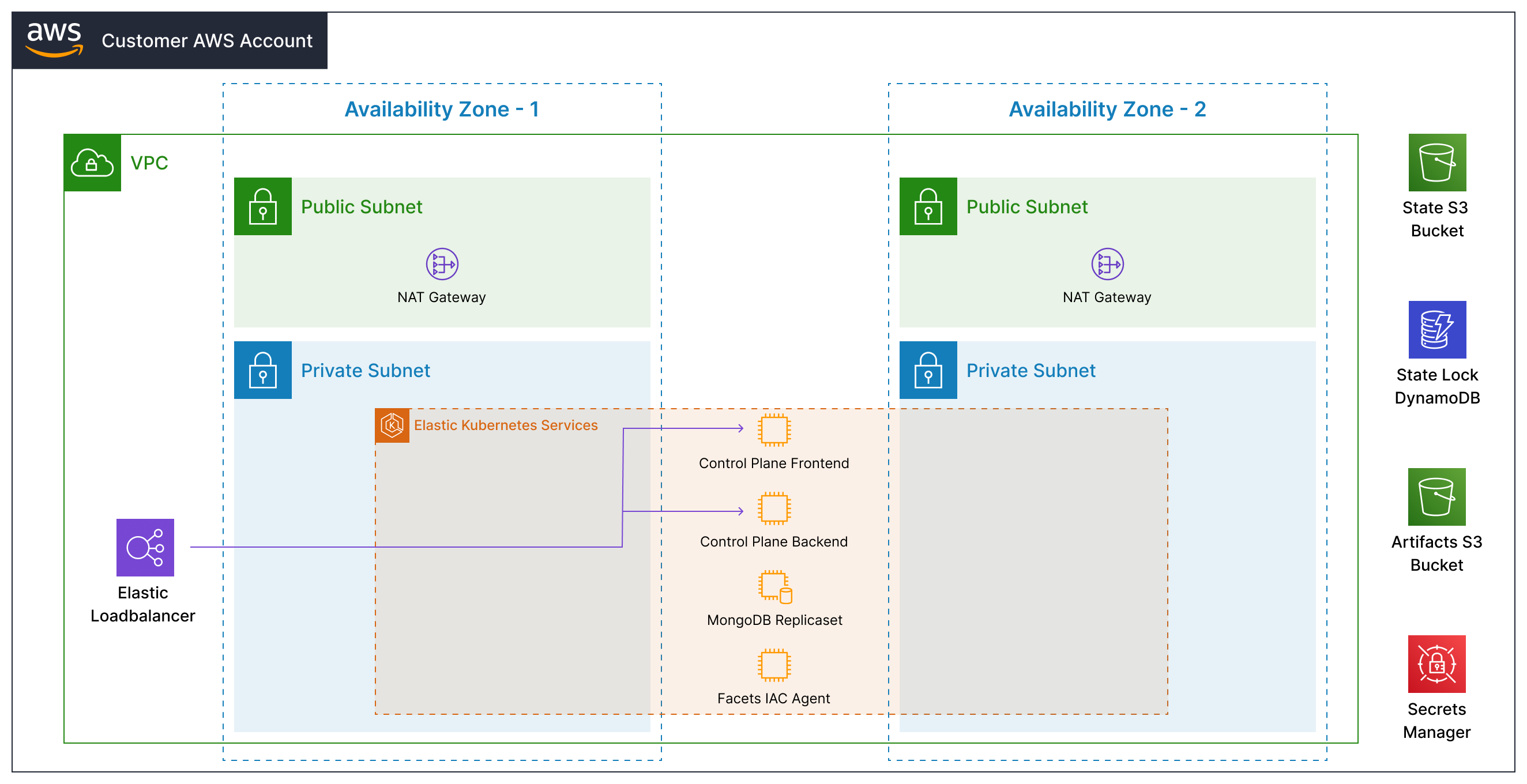
Inside the EKS cluster, Facets runs these components:
- Control Plane Frontend pod: hosts the Facets UI you log in to.
- Control Plane Backend pod: runs the Terraform code that provisions, configures, and orchestrates your cloud resources.
- MongoDB Replica Set: stores platform metadata (overrides, environment configurations, etc.) needed to run Facets.
- Facets IaC Agent: manages infrastructure within the AWS environment, ensuring Kubernetes clusters, databases, load balancers, and other components are correctly provisioned, configured, and maintained.
Steps
- Get a demo: To get started, request a demo by contacting the Facets team. The team will understand your requirements and help you get started.
- Launch the CloudFormation template: You will receive an email with a personalized link to launch a CloudFormation template. This template creates an IAM role in the AWS account of your choice. The CloudFormation template must be executed in the Mumbai region. This does not determine the region of your control plane.
- The Facets team launches the control plane: After you have created the IAM role in the AWS account, the Facets team launches the control plane in the closest region to your developers. The control plane is set up and ready to use in 60 minutes.
- Welcome email with control plane URL: You will receive a welcome email with your personal control plane URL, along with a username and password reset link. Use these to log into the control plane and start using Facets.
Facets never asks for IAM user credentials
Facets never requires you to provide any IAM User credentials (root or otherwise). The IAM role created by the CloudFormation template has a limited set of IAM policies attached and a trust policy set. You can optionally limit the role permissions further after the initial control plane setup by updating the CloudFormation stack with its option to limit permissions.
Deployment options
You may run the control plane in any AWS Region and Availability Zones of your choice. Communicate your preferences with the Facets team before deployment. Request any resource sizing changes by email to support@facets.cloud.
Backups
The control plane data is backed up as follows:
- The S3 bucket storing IAC state is versioned. See this guide for restoring previous versions.
- Any changes to the metadata (overrides, environment configurations, etc.) are versioned in the control plane and can be recovered with the click of a button. In addition, the metadata EBS volumes are backed up in EBS Snapshots at a daily frequency. Daily snapshots are maintained for 15 days and weekly snapshots for 4 weeks.
- Data in AWS Secrets Manager is also versioned. See this guide for restoring previous versions.
Next steps
Your control plane starts with no IaC modules, so the first thing to do is import a project type, which loads the official modules and output types for AWS in one command. After that you can create a project and build its blueprint.
For any support, email support@facets.cloud.
Self-hosted
Self-host the Facets control plane in your own AWS, GCP, or Azure account for data residency, network isolation, or BYOC cost ownership, ready in ~60 minutes.
GCP
Set up your self-hosted Facets control plane in GCP, covering required APIs and permissions, GKE and networking resources, Secret Manager modes, and Shared VPC.